
Slack Alerts for Cron Jobs: Webhook Scripts and Heartbeat Monitoring
There are two ways to get Slack alerts for cron jobs. You can wrap the job in a small script that posts to a Slack incoming webhook when the command exits with a non-zero status, or the job can ping a heartbeat monitor, which posts to Slack when the job reports a failure or when its ping doesn't arrive on time. The wrapper needs no other service, but it only runs when the job runs, so it can't report a run that never started (server down, cron stopped, crontab line deleted) or a job that hangs. A heartbeat monitor catches those cases too.
This guide is published by Watchgoose, a monitor for cron jobs and other scheduled work. We ran both wrappers on macOS and under cron on Debian 13 on 28 and 29 October 2026, posting to a local stand-in for Slack. How we tested lists the versions.
Table of contents
- Two ways to send cron alerts to Slack
- Create a Slack incoming webhook
- A bash wrapper that posts failures to Slack
- The same wrapper in Python
- Format the message with Block Kit and mrkdwn
- Rate limits and alert floods
- Webhook script vs heartbeat monitor
- Monitor cron jobs and alert Slack with Watchgoose
- Frequently asked questions
- Conclusion
Two ways to send cron alerts to Slack
1. The job posts to Slack itself. A wrapper script runs your command, checks the exit status and, if it isn't zero, sends a JSON message to a Slack incoming webhook. This works when the job runs but fails, such as a backup script that can't reach the database.
2. A monitor posts to Slack for the job. The job sends an HTTP request (a "ping") to a monitoring service when it finishes, or pings a failure URL. The service knows the schedule, and if the success ping is later than the expected time plus a grace period, it posts to Slack from outside your server.
The difference shows up in failures that leave no process running to report them:
- the server is powered off, out of memory or offline
- the cron daemon has stopped, or someone removed or broke the crontab line
- the job is stuck on a lock or a network call without a timeout, and never exits
- the wrapper itself fails, for example because
jqdisappeared after an OS upgrade
In all of these, approach 1 posts nothing, and a quiet channel looks the same as a healthy job.
Create a Slack incoming webhook
An incoming webhook is a unique URL. JSON that you POST to it appears as a message in one Slack channel. Slack's steps:
- Go to api.slack.com/apps and create an app. Pick a name and the workspace it belongs to.
- On the app's settings page, open Incoming Webhooks and switch Activate Incoming Webhooks on.
- Click Add New Webhook to Workspace, pick the channel and click Authorize. For a private channel, you must be a member first.
- Copy the new URL from Webhook URLs for Your Workspace. It looks like
https://hooks.slack.com/services/T00000000/B00000000/XXXXXXXXXXXXXXXXXXXXXXXX.
According to Slack's docs, an app webhook always posts to the channel picked when it was created, with the app's name and icon, and the payload can't override them. For a second channel, create a second webhook.
Older "custom integration" webhooks, which did accept channel and username overrides, are now listed by Slack as legacy, and Slack recommends moving them to app-based webhooks.
Keep the webhook URL secret
Anyone with the URL can post to your channel. Slack's docs say not to share it online, including in public repositories, and that Slack revokes leaked secrets it finds. Keep it out of the crontab, which often ends up in git, and out of scripts you commit. Instead, create ~/.config/cron-slack.env with an editor, so the URL doesn't end up in your shell history:
export SLACK_WEBHOOK_URL='https://hooks.slack.com/services/T00000000/B00000000/XXXXXXXXXXXXXXXXXXXXXXXX'
Then lock it down:
chmod 600 ~/.config/cron-slack.env
Both wrappers below read this file, so the URL stays out of the crontab and the scripts.
Test the webhook
Load the file into your shell and send a test message:
. ~/.config/cron-slack.env
curl -sS -H 'Content-Type: application/json' \
  --data '{"text":"Hello from cron"}' \
  "$SLACK_WEBHOOK_URL"
Slack replies with HTTP 200 and the plain text ok, and the message appears in the channel.
A bash wrapper that posts failures to Slack
Save this as /usr/local/bin/slack-on-fail.sh and make it executable with chmod +x /usr/local/bin/slack-on-fail.sh. It needs curl and jq.
#!/usr/bin/env bash
# Run a command. Post to Slack when it starts failing and when it recovers.
# Usage: slack-on-fail.sh JOB_NAME COMMAND [ARGS...]
# Alerting is best effort: the command always runs, and the wrapper exits
# with the command's own status.
set -u
job="$1"; shift
log=$(mktemp) || exec "$@" # no temp file: run the job without alerts
trap 'rm -f "$log"' EXIT
"$@" >"$log" 2>&1
status=$?
cat "$log" # keep the output in cron's mail or log as before
ENV_FILE="${SLACK_ENV_FILE:-$HOME/.config/cron-slack.env}"
[ -r "$ENV_FILE" ] && . "$ENV_FILE"
state_dir="${XDG_STATE_HOME:-$HOME/.local/state}/cron-slack"
state_file="$state_dir/$(printf '%s' "$job" | tr -c 'A-Za-z0-9._-' '_').failed"
post() {
# $1 = summary line, $2 = output to show (may be empty)
if [ -z "${SLACK_WEBHOOK_URL:-}" ]; then
echo "slack-on-fail: SLACK_WEBHOOK_URL is not set, no alert sent" >&2
return 1
fi
payload=$(jq -cn --arg summary "$1" --arg out "$2" '
def esc: gsub("&"; "&") | gsub("<"; "<") | gsub(">"; ">");
{
text: ($summary | esc),
blocks: ([
{ type: "section", text: { type: "mrkdwn", text: ($summary | esc) } }
] + (if $out == "" then [] else [
{ type: "section", text: { type: "mrkdwn",
text: ("```" + ($out | esc | .[-2900:]) + "```") } }
] end))
}') || return 1
curl -fsS -m 10 --retry 3 -o /dev/null \
-H 'Content-Type: application/json' \
--data-binary "$payload" "$SLACK_WEBHOOK_URL" && return 0
echo "slack-on-fail: could not post to Slack" >&2
return 1
}
host=$(hostname)
if [ "$status" -ne 0 ]; then
if [ ! -e "$state_file" ]; then
post ":red_circle: $job failed on $host (exit status $status)" \
"$(tail -n 20 "$log")" \
&& { mkdir -p "$state_dir" && touch "$state_file"; }
fi
elif [ -e "$state_file" ]; then
post ":large_green_circle: $job is working again on $host" "" \
&& rm -f "$state_file"
fi
exit "$status"
Use it in the crontab like this:
PATH=/usr/local/bin:/usr/bin:/bin
30 2 * * * /usr/local/bin/slack-on-fail.sh nightly-backup /usr/local/bin/backup.sh
Notes on the script:
- The command runs first. If the webhook URL is missing, Slack can't be reached or the state directory can't be created, the wrapper prints a message on stderr and still exits with the command's own status. A broken alert setup never stops the backup.
jq --argdoes the JSON escaping. A payload built withecho "{\"text\": \"$output\"}"breaks on the first quote, backslash or newline, and Slack rejects it withinvalid_payload. In our test, a failing command printed double quotes, Windows paths with backslashes, a tab and non-ASCII text, and every body the listener received passedpython3 -m json.tool.- Slack treats
&,<and>as control characters, so the script replaces them with&,<and>, as Slack's formatting docs ask. - It posts the last 20 lines, cut to 2,900 characters, because a section block's text is limited to 3,000 characters.
- The first failure posts and creates a state file. Later failures stay quiet until a successful run posts a recovery message and removes the file. If Slack can't be reached, no file is created, so the next failing run tries again.
- The script passes the output through, so
MAILTOand your logs keep working. - Cron runs jobs with a minimal
PATH, often only/usr/bin:/bin. Our Debian test failed until we added thePATHline.
curl gets the webhook URL as a command-line argument, so on a shared server other local users can see it in ps while the request runs. The Python version below keeps it inside the process.
To turn a hang into a failure, put GNU timeout in front of the command: slack-on-fail.sh nightly-backup timeout 2h /usr/local/bin/backup.sh. After two hours timeout stops the job and exits with status 124, which the wrapper reports, as long as the server is still up.
The same wrapper in Python
This version uses only the standard library and needs Python 3.9 or later. json.dumps does the JSON escaping. Save it as /usr/local/bin/slack_on_fail.py and make it executable with chmod +x /usr/local/bin/slack_on_fail.py.
#!/usr/bin/env python3
"""Run a command. Post to Slack when it starts failing and when it recovers.
Usage: slack_on_fail.py JOB_NAME COMMAND [ARGS...]
Alerting is best effort: the command always runs, and the wrapper exits
with the command's own status.
"""
import json
import os
import socket
import subprocess
import sys
import urllib.request
from pathlib import Path
job, cmd = sys.argv[1], sys.argv[2:]
# Run the job first, so a Slack or config problem can't stop it.
try:
result = subprocess.run(cmd, stdout=subprocess.PIPE, stderr=subprocess.STDOUT)
output = result.stdout.decode(errors="replace")
# A job killed by a signal gets a negative code; report 128 + N like a shell.
status = result.returncode if result.returncode >= 0 else 128 - result.returncode
except OSError as e: # like a shell: 127 if not found, 126 if it can't be run
status = 127 if isinstance(e, FileNotFoundError) else 126
output = f"slack_on_fail: cannot run {cmd[0]}: {e}\n"
print(output, end="", flush=True)
def webhook_url():
if os.environ.get("SLACK_WEBHOOK_URL"):
return os.environ["SLACK_WEBHOOK_URL"]
env_file = os.environ.get("SLACK_ENV_FILE", Path.home() / ".config/cron-slack.env")
for line in Path(env_file).read_text().splitlines():
key, _, value = line.strip().removeprefix("export ").partition("=")
value = value.strip().strip("'\"")
if key.strip() == "SLACK_WEBHOOK_URL" and value:
return value
raise RuntimeError(f"SLACK_WEBHOOK_URL is not set in {env_file}")
def esc(s):
return s.replace("&", "&").replace("<", "<").replace(">", ">")
def post(summary, text=""):
blocks = [{"type": "section", "text": {"type": "mrkdwn", "text": esc(summary)}}]
if text:
blocks.append({"type": "section",
"text": {"type": "mrkdwn", "text": "```" + esc(text)[-2900:] + "```"}})
data = json.dumps({"text": esc(summary), "blocks": blocks}).encode()
req = urllib.request.Request(webhook_url(), data=data,
headers={"Content-Type": "application/json"})
urllib.request.urlopen(req, timeout=10).read()
try:
state_dir = Path(os.environ.get("XDG_STATE_HOME", Path.home() / ".local/state")) / "cron-slack"
state_file = state_dir / ("".join(c if c.isalnum() or c in "._-" else "_" for c in job) + ".failed")
host = socket.gethostname()
if status != 0:
if not state_file.exists():
tail = "\n".join(output.splitlines()[-20:])
post(f":red_circle: {job} failed on {host} (exit status {status})", tail)
state_dir.mkdir(parents=True, exist_ok=True)
state_file.touch()
elif state_file.exists():
post(f":large_green_circle: {job} is working again on {host}")
state_file.unlink()
except Exception as e: # an alerting problem must not change the job's result
print(f"slack_on_fail: no alert sent: {e}", file=sys.stderr)
sys.exit(status)
The script takes the URL from the SLACK_WEBHOOK_URL environment variable, or reads the SLACK_WEBHOOK_URL= line from the same env file, so the crontab line stays short:
PATH=/usr/local/bin:/usr/bin:/bin
30 2 * * * /usr/local/bin/slack_on_fail.py nightly-backup /usr/local/bin/backup.sh
It behaves like the bash version: the job runs first, an alerting problem only prints a message on stderr, and the wrapper exits with the job's status. Python reports a job killed by a signal with a negative return code (-15 for SIGTERM), so the script turns it into 128 plus the signal number (143), as a shell does. If the command can't be started, it uses the same codes as bash: 127 when the command doesn't exist, and 126 when it exists but can't be run, for example because it isn't executable.
In our tests, both wrappers still ran the job and kept its exit status when the webhook URL was missing or malformed, when the state directory couldn't be created and when the job was killed with SIGTERM. Run from cron every minute against a failing job, each posted once.
Format the message with Block Kit and mrkdwn
A webhook message is JSON with a top-level text field and an optional blocks array. Always send text. Slack uses it for notifications (mobile notifications use only text), and a webhook request without it can fail with no_text. Blocks control the layout in the channel.
Three block types cover most alerts:
Scroll horizontally to see all columns.
| Block | Use it for | Limits |
|---|---|---|
header | A large title line | plain_text only, up to 150 characters |
section | Body text, or fields shown in two columns | Text up to 3,000 characters; up to 10 fields of 2,000 characters each |
context | Small grey footer text, such as a runbook link | Up to 10 elements |
An example with the exit status and start time side by side:
{
  "text": "nightly-backup failed on db1 (exit status 3)",
  "blocks": [
    {
      "type": "header",
      "text": { "type": "plain_text", "text": "nightly-backup failed on db1" }
    },
    {
      "type": "section",
      "fields": [
        { "type": "mrkdwn", "text": "*Exit status:*\n3" },
        { "type": "mrkdwn", "text": "*Started:*\n02:30 UTC" }
      ]
    },
    {
      "type": "section",
      "text": { "type": "mrkdwn", "text": "```pg_dump: error: connection to server failed```" }
    },
    {
      "type": "context",
      "elements": [
        { "type": "mrkdwn", "text": "<https://wiki.example.com/backups|Runbook: restoring backups>" }
      ]
    }
  ]
}
Slack's mrkdwn has its own rules: *bold* with single asterisks, _italic_, ~strike~, `code`, three backticks around a block, links as <https://example.com|link text> and \n for line breaks. Escape only &, < and >.
Check what your job prints before you post it. Connection strings, tokens in URLs and customer emails often appear in error messages, and everyone in the channel can read them.
Rate limits and alert floods
Slack's rate limit for incoming webhooks is one message per second, with short bursts above that allowed. Its docs also say apps may post no more than one message per second per channel, however they post. If you go over, Slack answers with HTTP 429 and a Retry-After header that gives the number of seconds to wait.
One job won't get near that. The trouble starts when one cause, such as a database outage, breaks dozens of jobs in the same minute. Some posts get a 429 and the rest bury the channel. The state-change logic above helps, because a job that keeps failing posts once. Also:
- Use separate channels, each with its own webhook, for urgent and routine jobs.
- Post recoveries, so people can see what is already fixed.
- Check the HTTP status. Slack returns errors such as
no_servicewhen a webhook was removed andchannel_is_archivedfor an archived channel. Withcurl -fthese appear in cron's mail or log.
Webhook script vs heartbeat monitor
Scroll horizontally to see all columns.
| Wrapper posts to a Slack webhook | Heartbeat monitor posts to Slack | |
|---|---|---|
| Failed run (non-zero exit) | Yes, right away | Yes, right away if the job pings a failure URL; otherwise after the grace time |
| Missed run (server down, cron stopped, crontab line removed) | No | Yes, after the grace time |
| Hung run | Only with timeout, while the server is up | Yes, when the job sends a start ping and no success arrives within the grace time |
| Recovery message | Only if you build it (state file) | Yes |
| Setup | Slack app, wrapper script and jq on every server | Slack app, one check per job, one curl call in the job |
| Where the Slack webhook URL lives | On every server that runs jobs | In the monitoring service; servers hold only ping URLs |
Monitor cron jobs and alert Slack with Watchgoose
A wrapper is part of the run it reports on. If cron never starts the job, the wrapper never starts either, and if the server is off, nothing is left to send an alert. Only something outside the server can notice that an expected signal didn't come.
Watchgoose works that way. Each job gets a check with the job's schedule (a cron expression, a systemd OnCalendar expression or a simple period), its time zone and a grace time. The job pings the check's URL when it finishes. If the ping is late by more than the grace time, or the job reports a failure, Watchgoose alerts Slack.
Connect Slack to Watchgoose
- In Slack, create an incoming webhook for the alert channel, as in Create a Slack incoming webhook.
- In Watchgoose, open your project's Integrations page and click Add Integration next to Slack.
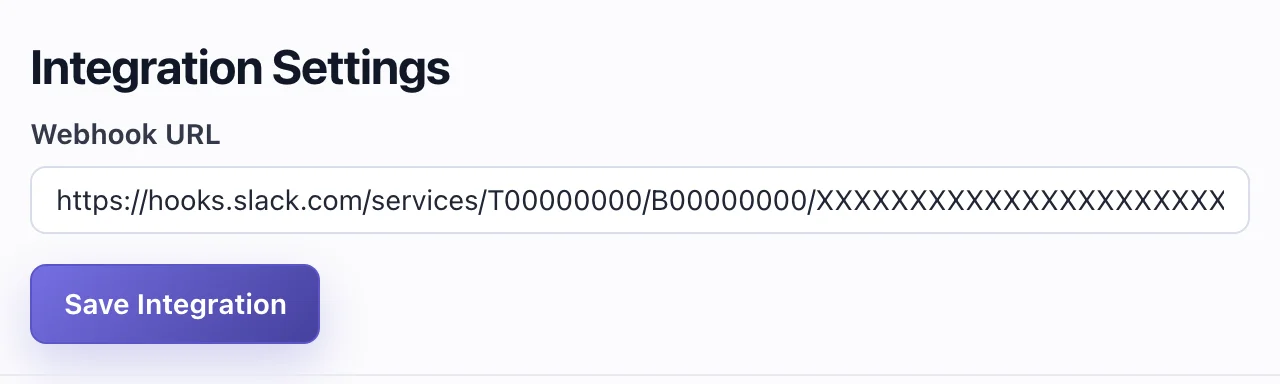
- Paste the URL into the Webhook URL field and click Save Integration.
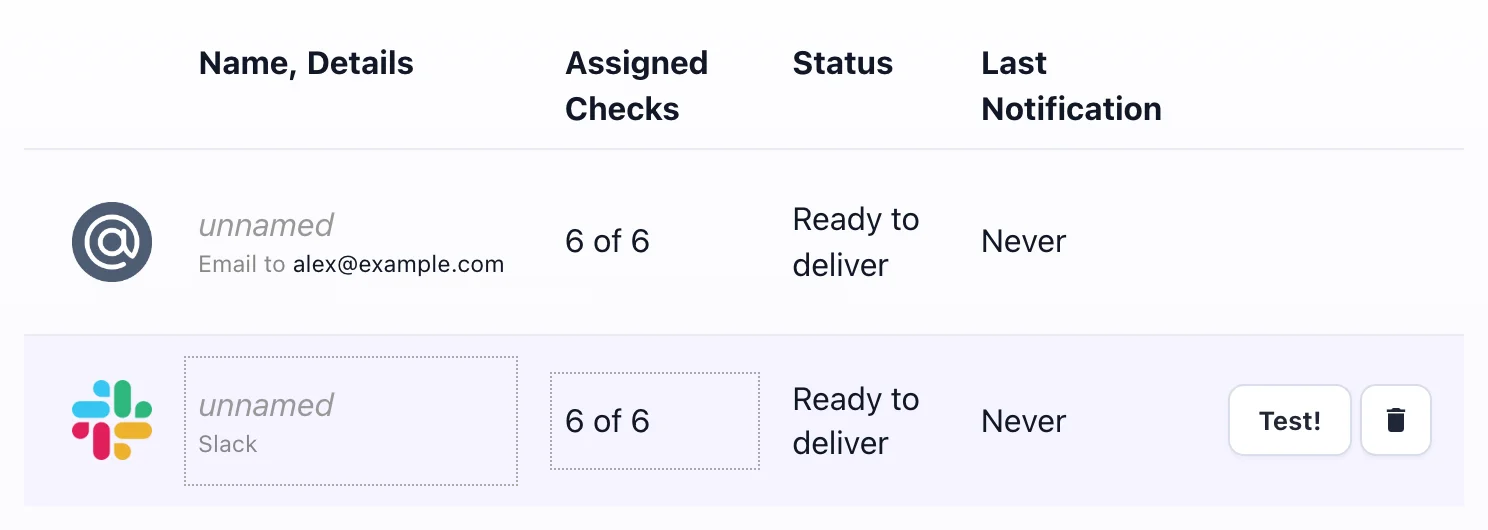
- Hover over the new integration's row and click Test! to post a sample alert for a check named "TEST".
The webhook URL stays in Watchgoose. Your servers only hold ping URLs, which can't post to Slack.
A new integration is turned on for every check in the project, and new checks get all of the project's integrations. You can switch them on and off per check on the Checks page or the check's details page. To send routine jobs to #cron and critical ones to #ops-urgent, add a Slack integration for each channel and switch them per check. Email, Microsoft Teams, PagerDuty and the other 12+ alert channels work the same way; see configuring notifications. If Slack reports that the webhook no longer exists (HTTP 404), Watchgoose marks the integration as Disabled.
What the Slack alert contains
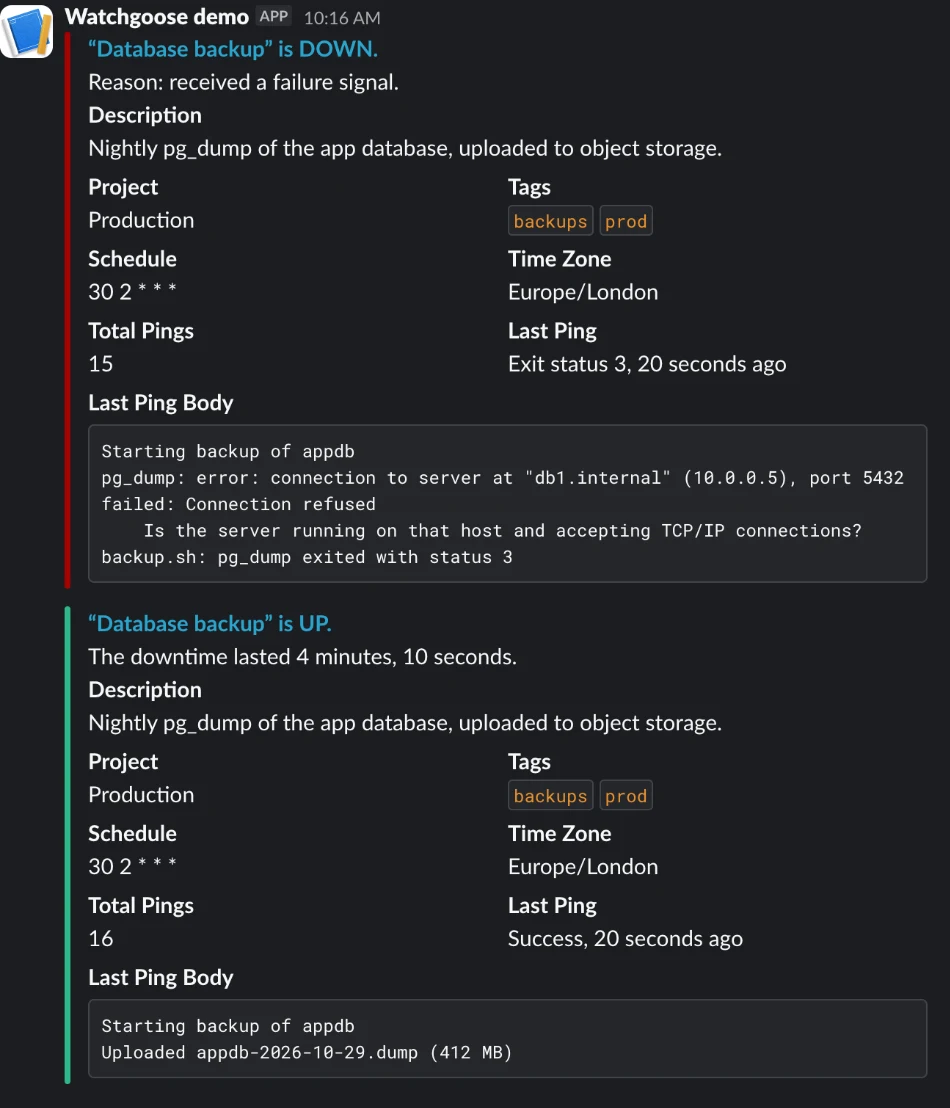
Each alert is one message, with a red bar when a check goes down and a green bar when it recovers. It contains:
- the check name and new status, as in “nightly-backup” is DOWN, linked to the check
- the reason, "success signal did not arrive on time, grace time passed" or "received a failure signal", or for a recovery, how long the downtime lasted
- the check's description, project name and tags, if set
- the schedule and time zone, or the period for simple checks
- the total number of pings and the last ping, such as "Exit status 3, 10 minutes ago"
- the last ping's request body, up to 1,000 characters, in a code block (left out if the body contains three backticks in a row)
The message appears under the name and icon of the Slack app you created.
Watchgoose posts once per status change, not for every failed run while a check stays down. A new check's first success and a check resumed after a pause don't post. For repeated reminders, use the hourly or daily email reminders in configuring notifications.
Ping from the cron job
The shortest version pings only on success:
30 2 * * * /usr/local/bin/backup.sh && curl -fsS -m 10 --retry 5 -o /dev/null https://watchgoose.com/ping/your-uuid-here
To get failure alerts right away, send the exit status (0 is success, 1 to 255 is failure):
30 2 * * * /usr/local/bin/backup.sh; curl -fsS -m 10 --retry 5 -o /dev/null https://watchgoose.com/ping/your-uuid-here/$?
A small script can also send a start ping and the last lines of output:
#!/usr/bin/env bash
# Run the backup and report start, result and the last output lines to Watchgoose.
url="${WATCHGOOSE_CHECK_URL:-}"   # if unset, curl reports an error and the backup still runs

curl -fsS -m 10 --retry 5 -o /dev/null "$url/start"

out=$(/usr/local/bin/backup.sh 2>&1)
status=$?
printf '%s\n' "$out"

printf '%s\n' "$out" | tail -n 20 |
  curl -fsS -m 10 --retry 5 -o /dev/null --data-binary @- "$url/$status"

exit "$status"
WATCHGOOSE_CHECK_URL=https://watchgoose.com/ping/your-uuid-here
30 2 * * * /usr/local/bin/backup-with-ping.sh
The /start ping lets Watchgoose measure run time, and if a run starts but no success ping arrives within the grace time, the check goes down. That covers hung jobs. The final ping goes to /<exit status>, so a failed run alerts right away, with the last 20 lines of output in the Slack message and the check's event log. The script sends only the tail because Slack shows the first 1,000 characters of the body. Every curl call has a 10-second timeout and retries, and the script doesn't use set -e, so a network problem or a missing URL never changes the job's result. Attaching logs explains how much of a body Watchgoose stores.
Run the job once by hand, or wait for its first scheduled run, and confirm the check's status changes from New to Up. A new check doesn't alert about missed runs until its first success ping arrives. A /start ping is the exception: it starts the run-time timer right away, even on a new check, so a first run that starts and hangs still raises an alert.
More detail is in monitoring cron jobs, signaling failures, measuring script run time and the bash examples. The Free plan includes 10 checks with no credit card required.
Frequently asked questions
How do I send a Slack message when a cron job fails?
Create a Slack app, turn on incoming webhooks and add a webhook for your channel. Then run the job through a wrapper script that checks the exit status and, when it is not zero, posts JSON to the webhook URL with curl or Python. Build the JSON with jq or json.dumps so that quotes, backslashes and newlines in the output can't break it.
Can Slack tell me when a cron job did not run?
Not by itself. Slack only shows messages that something sends to it, and a job that never started sends nothing. To get an alert for a missed run, the job pings a heartbeat monitor after each run. The monitor knows the schedule and posts to Slack when the expected ping is late by more than the grace time.
What is the rate limit for Slack incoming webhooks?
Slack documents one message per second for incoming webhooks, with short bursts allowed. Apps should also post no more than one message per second to a channel. If you go over the limit, Slack returns HTTP 429 with a Retry-After header giving the number of seconds to wait before sending again.
How do I stop repeated Slack alerts from a failing cron job?
Alert on state changes, not on every failed run. Store a small state file when a failure is posted and stay quiet while it exists. When a run succeeds, post a recovery message and delete the file. Heartbeat monitors such as Watchgoose already work this way: one message when the job goes down, one when it recovers.
Where should I store a Slack webhook URL for cron jobs?
Keep it in an environment file that only the job's user can read (chmod 600) and load it from the wrapper or the crontab line. Don't write it in the crontab or in scripts you commit, because anyone with the URL can post to your channel. Slack revokes webhook URLs it finds leaked in public places.
Conclusion
A wrapper that posts to a Slack incoming webhook shows failed runs and their output in Slack, as long as it builds the JSON with jq or json.dumps and only alerts on state changes. It can't report a run that never started. For that, the job pings a heartbeat monitor, which posts to Slack when the ping is late.
How we tested
We ran both wrappers on macOS 26 (bash 5.3 and 3.2, jq 1.7.1, curl 8.7.1, Python 3.14.10 and 3.9.6) and under cron on Debian 13 (bash 5.2, jq 1.7, curl 8.14, Python 3.14.10), posting to a local HTTP listener in place of Slack. The tests covered a missing or malformed webhook URL, a state directory that can't be created, a job killed with SIGTERM, a command that doesn't exist and a file without execute permission. We checked the Slack limits and field names against Slack's docs on 28 October 2026.