
Best Backup Monitoring Software in 2026
The best backup monitoring tools for small teams, sysadmins, MSPs and developers in 2026 are Watchgoose, Healthchecks.io, Cronitor, Dead Man's Snitch, Better Stack, UptimeRobot, Backup Radar and Veeam ONE. The first six are heartbeat monitors: your backup job sends an HTTP request when it finishes, and you get an alert when that request is late or reports a failure. Backup Radar collects results from backup products for MSPs, and Veeam ONE watches Veeam environments.
A failed backup rarely makes noise. A cron entry gets lost in a server move, or the disk fills and the dump comes out empty, and you find out at restore time.
Scope note: This comparison covers tools that tell you when a backup did not run, failed or produced nothing. It includes heartbeat monitors that wrap any backup tool or script, plus two backup-product tools that many readers will also shortlist: Backup Radar for MSPs and Veeam ONE for Veeam users. It does not compare backup software itself, storage, or restore testing. We left out Sentry Crons, which fits application jobs that already report to Sentry better than server backups; our small-team cron monitoring comparison covers it.
This guide is published by Watchgoose, a monitor for cron jobs and other scheduled work. We rank Watchgoose first for watching backup scripts from outside the server, with nothing to install, and checked every vendor's prices and documentation on 29 October 2026. How we tested has the details.
Table of contents
- Watchgoose: Heartbeat checks for any backup script
- Healthchecks.io: More free checks and a self-hosted option
- Cronitor: Run history, output and duration for backup jobs
- Dead Man's Snitch: Simple check-ins for a few critical backups
- Better Stack: Backup heartbeats inside on-call and incidents
- UptimeRobot: Backup heartbeats next to website checks
- Backup Radar: Multi-vendor backup reporting for MSPs
- Veeam ONE: Alarms and reports for Veeam environments
- Pricing at a glance
- Comparison table
- How to choose
- Frequently asked questions
- Conclusion
1. Watchgoose: Heartbeat checks for any backup script
Watchgoose is a hosted monitor for cron jobs, backups, queues and scripts. It suits small teams and agencies whose backups run as scripts, cron jobs or systemd timers. Each backup gets a check with a schedule: a cron expression, a systemd OnCalendar expression or a simple period, plus a time zone and a grace time. The backup sends an HTTP request (a ping) when it finishes. If the ping does not arrive within the schedule plus the grace time, Watchgoose alerts you.
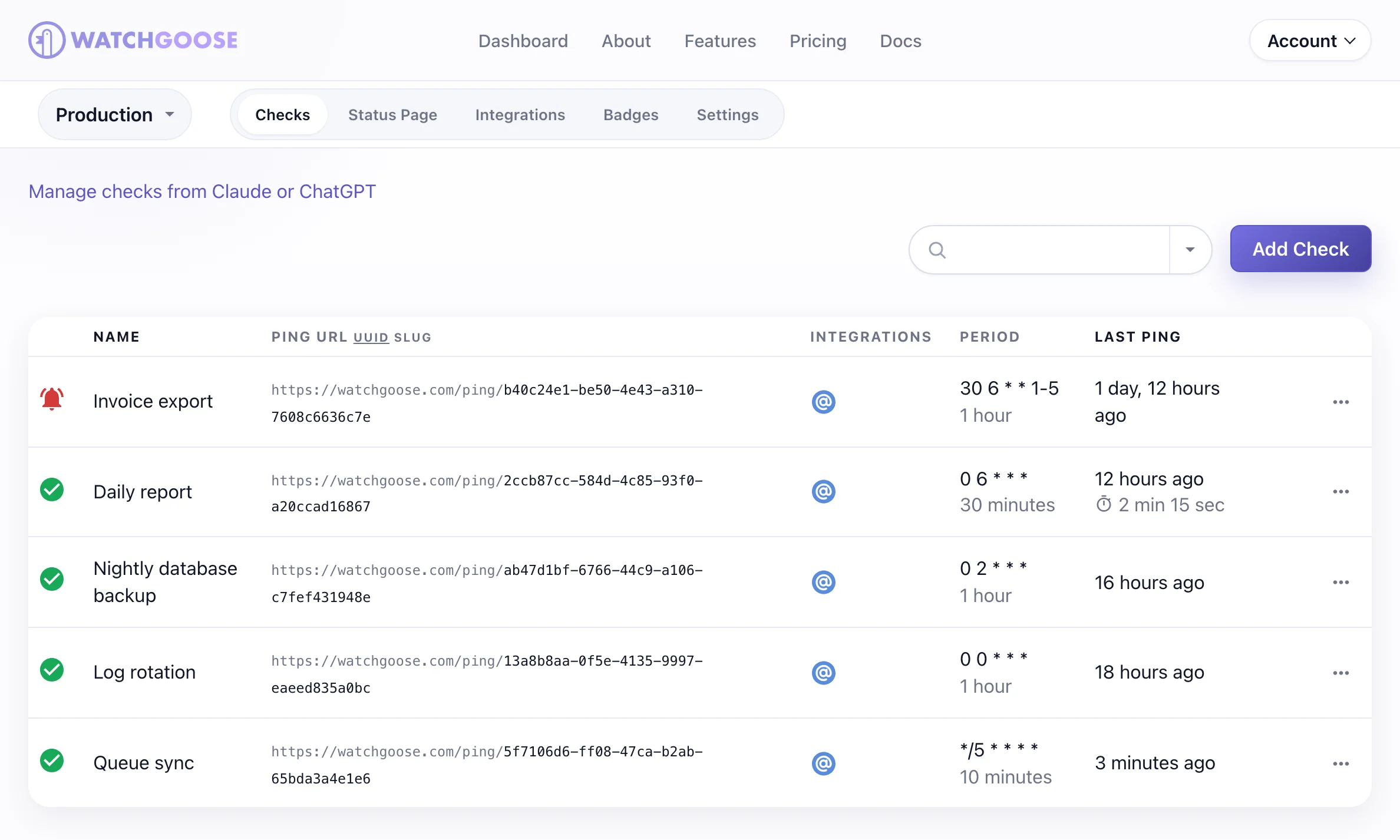
A backup can also report problems directly. Append /fail to the ping URL to signal a failure, or append the exit status (0 means success, 1 to 255 mean failure). A /start ping before the backup lets Watchgoose measure the run time and alert when a run takes longer than the grace time. The body of a POST ping, such as a one-line summary, is stored with the event up to a size limit.
Backup tools that can only send an email report can use the check's email address instead, with keyword rules that classify each report as start, success or failure.
Alerts can go to email, Slack, Microsoft Teams, Discord, Telegram, PagerDuty, Opsgenie, Pushover, Mattermost, webhooks and other channels, 12+ in all. The Free plan includes 10 checks with no credit card required. The Startup plan covers 100 checks for €17 a month and adds team access.
The tradeoff is scope. Watchgoose is a hosted service and knows only what your job tells it. It does not make, store or restore backups, or read results from backup products through their APIs.
Check the backup file before the success ping
A backup command can exit with status 0 and still write nothing, and a check that only looks for a recent file can pass on the previous run's backup. The script below gives each run its own new file and runs the backup into it. It then checks that this file is not empty and that pg_restore --list can read it, and only then moves it to its final name and sends the success ping. If the backup tool fails, the script reports the tool's exit status; if a check fails, it sends /fail and deletes the bad file. Earlier backups are never touched. A missing URL, a network error or an HTTP error from the receiver prints a warning and never changes the script's exit status.
Save it as /usr/local/bin/backup-with-check.sh and replace the pg_dump and pg_restore --list lines with your own backup command and a check that suits its output:
#!/bin/bash
# Nightly database backup that reports to Watchgoose only after checking this run's file.

BACKUP_DIR="${BACKUP_DIR:-/var/backups/db}"
CHECK_URL="${WATCHGOOSE_CHECK_URL:-}"

ping_watchgoose() {
  # $1: "" for success, "/fail", or "/<exit status>". $2: short log message.
  if [ -z "$CHECK_URL" ]; then
    echo "warning: WATCHGOOSE_CHECK_URL is not set, no ping sent" >&2
    return 0
  fi
  if ! curl -fsS -m 10 --retry 5 --data-raw "$2" "$CHECK_URL$1" >/dev/null; then
    echo "warning: could not send the Watchgoose ping" >&2
  fi
  return 0
}

# 1. Give this run its own new, empty file, so an older backup can't pass the checks.
tmp_file=$(mktemp "$BACKUP_DIR/.app-partial.XXXXXX") || {
  ping_watchgoose "/fail" "cannot create a file in $BACKUP_DIR"
  exit 1
}

# 2. Run the backup into that file.
pg_dump --format=custom --file="$tmp_file" app
status=$?

# 3. The backup tool failed: report its exit status and keep it.
if [ "$status" -ne 0 ]; then
  rm -f "$tmp_file"
  ping_watchgoose "/$status" "pg_dump exited with status $status"
  exit "$status"
fi

# 4. The tool said OK: this run's file must not be empty and must be a readable dump.
if [ ! -s "$tmp_file" ]; then
  rm -f "$tmp_file"
  ping_watchgoose "/fail" "pg_dump exited 0 but wrote nothing"
  exit 1
fi
if ! pg_restore --list "$tmp_file" >/dev/null; then
  rm -f "$tmp_file"
  ping_watchgoose "/fail" "pg_restore cannot read the new dump"
  exit 1
fi

# 5. Publish it under a new final name. Earlier backups are left alone.
backup_file="$BACKUP_DIR/app-$(date +%Y-%m-%dT%H%M%S)-${tmp_file##*.}.dump"
if [ -e "$backup_file" ] || ! mv "$tmp_file" "$backup_file"; then
  rm -f "$tmp_file"
  ping_watchgoose "/fail" "could not publish the new dump as $backup_file"
  exit 1
fi

size=$(wc -c < "$backup_file" | tr -d ' ')
ping_watchgoose "" "backup ok: $backup_file ($size bytes)"
exit 0
Make it executable, create the backup folder, and add the check's ping URL to the crontab line:
sudo chmod +x /usr/local/bin/backup-with-check.sh
sudo mkdir -p /var/backups/db
30 2 * * * WATCHGOOSE_CHECK_URL=https://watchgoose.com/ping/your-uuid-here /usr/local/bin/backup-with-check.sh
The script exits with the backup tool's own status when the tool fails (143 if it was killed by SIGTERM), with 1 when a check fails or the backup folder can't be written, and with 0 on success. Old backups stay in the folder, so prune them with your usual retention job. In our tests, a backup command that exited 0 without writing anything sent /fail even with a valid backup from 30 minutes earlier in the same folder, and the pg_restore --list check rejected a corrupt dump. In our tests, an endpoint that refused the connection added no delay, and a receiver that answered HTTP 500 made curl retry five times, which took about 31 seconds. Each attempt is capped at 10 seconds.
Run the script once by hand and confirm the check's status changes from New to Up. A new check doesn't alert about missed runs until its first success ping, but a /fail or exit-status ping alerts right away, and so does a /start ping whose run takes longer than the grace time. The Bash guide, signaling failures and attaching logs pages cover the details.
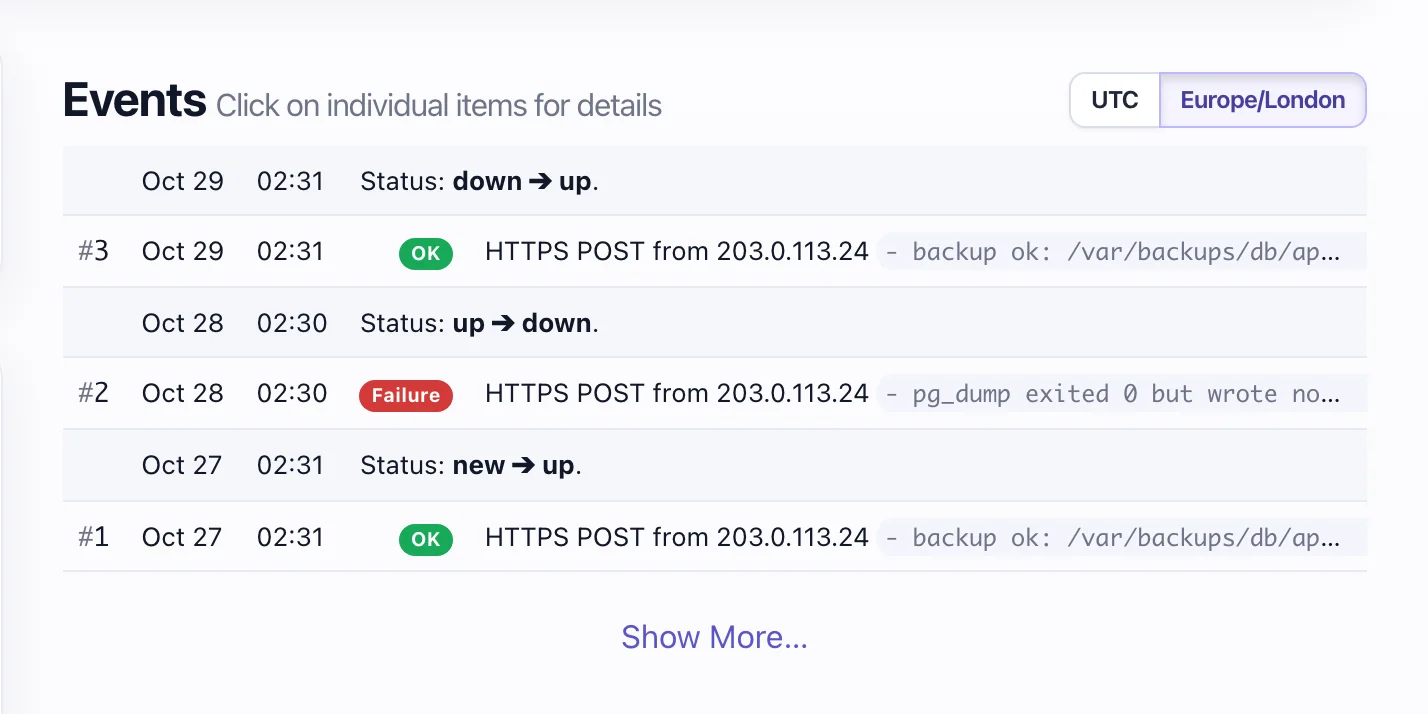
/fail with that reason and the check went down; the next night's good backup brought it back up.2. Healthchecks.io: More free checks and a self-hosted option
Healthchecks.io is a long-running heartbeat monitor for cron jobs and other periodic tasks, and it names filesystem and database backups as examples. It suits developers who want more free checks, or who want to run the monitor on their own server. A job pings a URL when it succeeds; it can also signal a start, a failure or an exit status, or check in by email with keyword rules. Each check has a period or cron schedule and a grace time.
Its free Hobbyist tier includes 20 checks and 100 log entries per check, as listed on its pricing page on 29 October 2026. The $5 a month Supporter tier has the same limits and exists to support the service. More capacity starts with Business at $20 a month for 100 checks, 1,000 log entries per check, 50 SMS and WhatsApp credits and 20 phone call credits, or $192 a year paid annually.
Alerts can go to email, webhooks, Slack, Discord, Microsoft Teams, Telegram, PagerDuty, Opsgenie, Signal, SMS, WhatsApp, phone calls and many more. The code is Open Source under the BSD 3-clause licence, so you can host your own instance on Python, Django and PostgreSQL or MySQL.
Self-hosting moves the work to you: upgrades, email delivery and keeping the monitor off the servers it watches.
3. Cronitor: Run history, output and duration for backup jobs
Cronitor tracks each run of a job, which suits teams that want per-run output, duration trends and crontab import for many scheduled jobs. The Cronitor CLI reads your crontab or Windows Task Scheduler, creates monitors and wraps each command, so status, duration and output are reported without changing the backup script. You can also send events yourself: state=run, state=complete or state=fail, with an optional exit code, through its telemetry API.
That helps with backups that slowly get worse, because a dump that keeps getting longer shows up before it misses its window. Cronitor keeps stdout and stderr with the run that produced them, and adds grace periods and failure tolerances to cut noise.
The free Hacker tier includes 5 monitors, one user, email and Slack alerts and a basic status page, but no SMS. The Business plan costs $2 per monitor and $5 per user each month with no base fee, after a 14-day trial. It adds all 11 alert integrations, SMS and on-call alerts (PagerDuty, Opsgenie and others) and 12 months of data retention.
The limitation is cost at scale and setup weight. Per-monitor and per-user pricing adds up when every database and server has its own backup, and the CLI is one more thing to install on each host.
4. Dead Man's Snitch: Simple check-ins for a few critical backups
Dead Man's Snitch fits one to three critical backups where a plain "did it check in?" alert is enough. It gives each job a unique URL called a snitch. The job requests the URL when it runs; if no check-in arrives during the interval, you get an alert. Jobs can also check in by email, and the optional Field Agent (dms) wraps a command and sends its duration, exit status and output.
Alerts go to email by default, with a mobile app for push notifications. Integrations with Slack, Microsoft Teams, PagerDuty, Opsgenie, ilert, VictorOps and webhooks are listed from the Private Eye plan up.
The free Lone Snitch plan covers one snitch. Little Birdy costs $5 a month for 3 snitches, Private Eye $19 a month for 100 snitches with integrations, and Surveillance Van $49 a month for 300 snitches with Smart Alerts and Error Notices. Its plans page (checked 29 October 2026) also offers on-premise hosting on request.
Two limits matter for backups. Alerts on a non-zero exit status (Error Notices) are only on Surveillance Van; on other plans a failed job is noticed only if it skips the check-in. Basic alerts also use fixed windows, so a daily snitch is checked at midnight UTC, and a backup that misses its 02:00 run may not alert until the window closes. Smart Alerts learn when a job usually checks in and shorten that delay; for daily snitches they need Surveillance Van.
5. Better Stack: Backup heartbeats inside on-call and incidents
Better Stack puts heartbeats inside a larger platform for uptime monitoring, incidents, on-call, status pages and logs. It suits teams that already run on-call schedules and want a missed backup to open an incident. A heartbeat expects a request at a set frequency with a grace period. A script can append /fail to report a failure, or send its exit code and output in the same request. A missed or failed heartbeat creates an incident for the on-call team.
The free version, labelled for personal projects, includes 10 monitors and heartbeats, one status page, and Slack and email alerts. Paid use starts with a responder licence at $29 a month billed annually ($34 billed monthly), which adds unlimited phone call and SMS alerts. Ten more heartbeats cost $17 a month billed annually or $20 billed monthly.
Its strength is the path from alert to owner, with escalation, phone calls and related logs in one place. If you only need to know that last night's backup ran, that is a lot of platform to pay for and configure.
6. UptimeRobot: Backup heartbeats next to website checks
UptimeRobot suits freelancers and agencies that already monitor client websites there and want backup checks on the same bill. Each heartbeat monitor gets a URL that accepts GET or POST requests; if a request does not arrive within the interval (one minute to 31 days) plus a grace period, the monitor goes down and you get an alert. On the pages we checked, it documents only success pings, so a failed backup shows up as a missed heartbeat after the grace period.
The free version has 50 monitors, but its pricing table marks heartbeat monitoring as not included. Heartbeats start with Solo at €9 a month billed annually (€108 a year) or €10 monthly, for 10 monitors with a 60-second interval. Solo adds Slack, Mattermost, Telegram and Microsoft Teams, and includes 10 to 20 one-off SMS or voice call credits. Webhooks, Zapier and PagerDuty need the Team plan at €30 a month billed annually.
It makes sense when the websites are the main job and backups come second. If backups are the main concern, a tool with a failure signal and exit codes gives you faster, clearer alerts.
7. Backup Radar: Multi-vendor backup reporting for MSPs
Backup Radar, now part of ScalePad, is built for MSPs that manage backups for many clients across several backup products. It works differently from heartbeat tools: it collects job results from supported backup products, through its integrations and email parsing, and normalises them into success, failure, warning and no-result states. You define the expected cadence and SLA per client, and it raises tickets in your PSA (ConnectWise, Autotask, HaloPSA, Kaseya BMS, ServiceNow or SyncroMSP) when a threshold is breached. It also produces client-facing backup reports.
Its integrations page listed 232 integrations on 29 October 2026. The pricing page lists $8 per client per month with a 30-client minimum, starting at $240 a month, plus $495 for onboarding, billed monthly on a 12-month term. There is no free version on the pricing page; it offers a demo. Backup Radar is a cloud service hosted on Microsoft Azure.
For a small team with a handful of backup scripts, the 30-client minimum and annual term make it a poor fit, and a script that is not one of its supported products still needs another way to report.
8. Veeam ONE: Alarms and reports for Veeam environments
Veeam ONE is Veeam's monitoring and reporting tool, for teams that back up with Veeam Backup & Replication and want job alarms and reports from the backup platform itself. Its predefined data protection alarms cover failing jobs and jobs finished with warnings, long-running jobs that exceed the backup window, fast-shrinking repository space and connectivity problems between backup components. An alarm can send email, send an SNMP trap or run a script.
The free Community Edition monitors up to 10 workloads, does not expire and needs no licence file. It runs on your own Windows server with at least 4 CPU cores, 8 GB of RAM and 5 GB of free disk. Larger environments need a paid licence as part of Veeam's packages; we found no public price, so treat it as quote only.
Veeam ONE sees what Veeam runs, in depth. It does not see a mysqldump cron job or a restic script on another server. It runs inside your environment, so an external heartbeat for the most important jobs gives you a second signal.
Pricing at a glance
Prices and allowances from each vendor's own pages, checked on 29 October 2026. Vendors change them often, so check before you migrate.
Scroll horizontally to see all columns.
| Tool | Free version | Lowest paid step |
|---|---|---|
| Watchgoose | Free: 10 checks, no credit card | Startup: €17 a month for 100 checks |
| Healthchecks.io | 20 checks, 100 log entries per check | Supporter: $5 a month, same limits; Business: $20 a month for 100 checks |
| Cronitor | 5 monitors, 1 user, email and Slack | $2 per monitor plus $5 per user each month |
| Dead Man's Snitch | 1 snitch | Little Birdy: $5 a month for 3 snitches |
| Better Stack | 10 monitors and heartbeats, Slack and email | Responder licence: $29 a month billed annually ($34 monthly) |
| UptimeRobot | None for heartbeats (50 website monitors) | Solo: €9 a month billed annually (€10 monthly), 10 monitors |
| Backup Radar | None listed (demo) | $8 per client a month, 30-client minimum ($240 a month), $495 onboarding |
| Veeam ONE | Community Edition: up to 10 workloads | Quote only |
Comparison table
How each tool notices a missing or failed backup, where alerts can go, and whether you can run it yourself. Checked on 29 October 2026.
Scroll horizontally to see all columns.
| Tool | Best for | Detects a missed or failed backup by | Alert channels | Self-hosting |
|---|---|---|---|---|
| Watchgoose | Backup scripts and scheduled jobs, small teams | Late ping after schedule plus grace; /fail, exit status, email report keywords | 12+ channels, including email, Slack, Teams, PagerDuty and webhooks | No, hosted |
| Healthchecks.io | More free checks or a self-hosted monitor | Late ping; /fail, exit status, email keywords | Email, chat, incident tools, SMS, WhatsApp, phone calls | Yes, Open Source |
| Cronitor | Run history, output and duration | Missed event; state=fail, exit code, CLI wrapper | Email and Slack free; 11 integrations, SMS and on-call paid | No |
| Dead Man's Snitch | One to three critical jobs | Missed check-in per interval (URL or email); exit status on top plan | Email, push app; Slack, Teams, PagerDuty and more from Private Eye | On request |
| Better Stack | Teams with on-call | Missed heartbeat; /fail, exit code with output | Email and Slack free; phone and SMS with responder licence | No |
| UptimeRobot | Website monitoring plus a few backups | Missed heartbeat only | Email; Slack, Teams, Telegram from Solo; webhooks from Team | No |
| Backup Radar | MSPs with many clients | Results from supported backup products (integrations and email parsing), including no-result | PSA tickets, dashboards, client reports | No, Azure-hosted |
| Veeam ONE | Veeam Backup & Replication users | Built-in alarms on failed, warning and long-running Veeam jobs | Email, SNMP traps, scripts | Yes, runs on your Windows server |
How to choose
Start with where your backups run.
- Backups are scripts or cron jobs. Use a heartbeat monitor: Watchgoose, Healthchecks.io, Cronitor, Dead Man's Snitch, Better Stack or UptimeRobot. Pick by free allowance, alert channels and whether a failure signal and exit codes are supported.
- Backups run inside Veeam. Veeam ONE reads job results directly. Add an external heartbeat for the most critical jobs if you want a second signal from outside.
- You are an MSP with many clients and backup vendors. Backup Radar is built for that, with per-client SLAs and PSA tickets.
For heartbeat tools, three settings decide whether alerts are useful:
- Send the success ping last, after the backup and its checks finish. A ping at the start only proves the script began.
- Set the grace time longer than a normal run, with room for slow nights, but short enough that you hear about a miss before the next working day.
- Report failures directly with
/failor the exit status, so you do not wait for the grace time when the tool already knows it failed.
Then test the alert path. Break a copy of the job on purpose, wait for the alert, and confirm it reaches the person who will fix it. The cron job monitoring docs and the systemd timer docs cover the setup for each scheduler.
Frequently asked questions
What is backup monitoring software?
Backup monitoring software tells you when a backup did not run, failed or produced nothing useful. Heartbeat monitors expect a signal from each backup job and alert when it is late or reports a failure. Backup-product tools such as Veeam ONE or Backup Radar read job results from the backup software itself. Neither kind proves a restore works, so test restores separately.
How do I get alerted when a backup job does not run?
Add a heartbeat ping to the end of the backup script. The monitor knows the schedule and waits for the ping plus a grace time. If the job never starts because the cron entry was removed or the server was off, no ping arrives and the monitor sends an alert. Send a failure signal or the exit status when the job runs but fails.
Is a successful exit code enough to trust a backup?
No. A backup command can exit with status 0 and still write an empty, partial or old file. Before the success ping, check that the backup file exists, is not empty and was written during this run, and send a failure signal if any check fails. Restore a copy from time to time, because a file that looks right can still fail to restore.
Which backup monitoring tools have a free tier?
As of 29 October 2026, Watchgoose, Healthchecks.io (20 checks), Cronitor (5 monitors), Better Stack (10 monitors and heartbeats) and Dead Man's Snitch (1 snitch) include heartbeat monitoring at no cost. Veeam ONE Community Edition is free for up to 10 workloads. UptimeRobot heartbeats need a paid plan, and Backup Radar lists no free version.
Can I monitor backup software that is not a script?
Yes, in most cases. If the backup software can run a command after each job, use that hook to send a heartbeat ping with the job's result. If it can only send an email report, Watchgoose, Healthchecks.io and Dead Man's Snitch accept email check-ins. Veeam ONE reads Veeam results directly, and Backup Radar collects results from many backup products for MSPs.
Conclusion
For backups that run as scripts, cron jobs or systemd timers, start with Watchgoose: create a check, send the success ping only after the file check, report failures directly, and confirm the alert reaches you. Healthchecks.io gives you more free checks or a self-hosted option, Cronitor adds run history, and Better Stack fits teams with on-call. MSPs with many clients should look at Backup Radar, and Veeam users at Veeam ONE.
How we tested
We fetched each vendor's pricing page and the documentation pages listed below on 29 October 2026 and saved copies. Prices use each vendor's own currency and billing period, and quote only means no public price. Plan details for UptimeRobot come from the checkmarks in its pricing comparison table. We did not sign up for any service, so we did not test vendor alerts or dashboards.
We ran the backup script above with GNU bash 3.2.57 (the macOS /bin/bash) and bash 5.3.20, curl 8.7.1, on macOS (Darwin 25.5), against a local Python 3.14 HTTP listener. A stub replaced pg_dump so we could force each result. We tested success, an empty file, a missing file, a stale file, a backup tool that exits with status 1, a backup killed by SIGTERM (exit 143), a missing or malformed ping URL, an endpoint that refuses connections and a receiver that returns HTTP 500. In every case the script sent the expected ping (or a warning) and kept the expected exit status. We did not run it against a real PostgreSQL database or the live Watchgoose endpoint; the ping URL forms match the Watchgoose Pinging API.
References
- Healthchecks.io: pricing, home page integrations list, self-hosted docs, signaling failures
- Cronitor: pricing, cron job monitoring, telemetry API
- Dead Man's Snitch: plans, FAQ, Field Agent, integrations, email check-ins
- Better Stack: pricing, cron and heartbeat monitor docs
- UptimeRobot: pricing, cron job monitoring
- Backup Radar: pricing, product overview, integrations
- Veeam ONE: Community Edition, license types, data protection alarms, alarm notifications