
Best Cron Job Monitoring Tools for Small Teams in 2026
The best cron job monitoring tools for small teams are Watchgoose, Healthchecks.io, Cronitor, Hyperping, Better Stack, Sentry Crons and UptimeRobot. All seven alert you when a scheduled job doesn't report in on time, but they differ in what you get at no cost, how much else they try to do, and what the first paid step costs. We checked every price and allowance below on each provider's pricing page on 28 October 2026.
A missed cron job usually stays quiet until a backup is missing, a report is late or a customer notices stale data. A small team needs to hear about that quickly, without taking on another system to run. Watchgoose comes first here for teams that want focused checks, quick setup and little ongoing work.
This guide is published by Watchgoose. We rank our own product first for the small-team use case described here and set out the tradeoffs so you can compare it with broader alternatives. The Watchgoose section shows our own dashboard with demo data. The other images are original Watchgoose editorial diagrams, not vendor-interface screenshots or endorsements.
Table of contents
- Watchgoose: Focused monitoring for jobs, backups and scripts
- Healthchecks.io: A simple heartbeat monitor with a generous no-cost tier
- Cronitor: Schedule-aware monitoring for complex cron workloads
- Hyperping: Cron checks with on-call and status pages
- Better Stack: Heartbeats beside logs and incident response
- Sentry Crons: Cron monitoring inside your error tracker
- UptimeRobot: Broad uptime monitoring with paid heartbeats
- AI assistant and MCP support
- Pricing at a glance
- Comparison table: Which cron monitoring tool fits your team?
- What to look for in cron job monitoring for a small team
- Frequently asked questions
- Conclusion
1. Watchgoose: Focused monitoring for jobs, backups and scripts
Watchgoose monitors cron jobs, backups, queues and scripts. It suits small teams that want an alert when a task fails or misses its expected success signal, without installing anything on their servers.
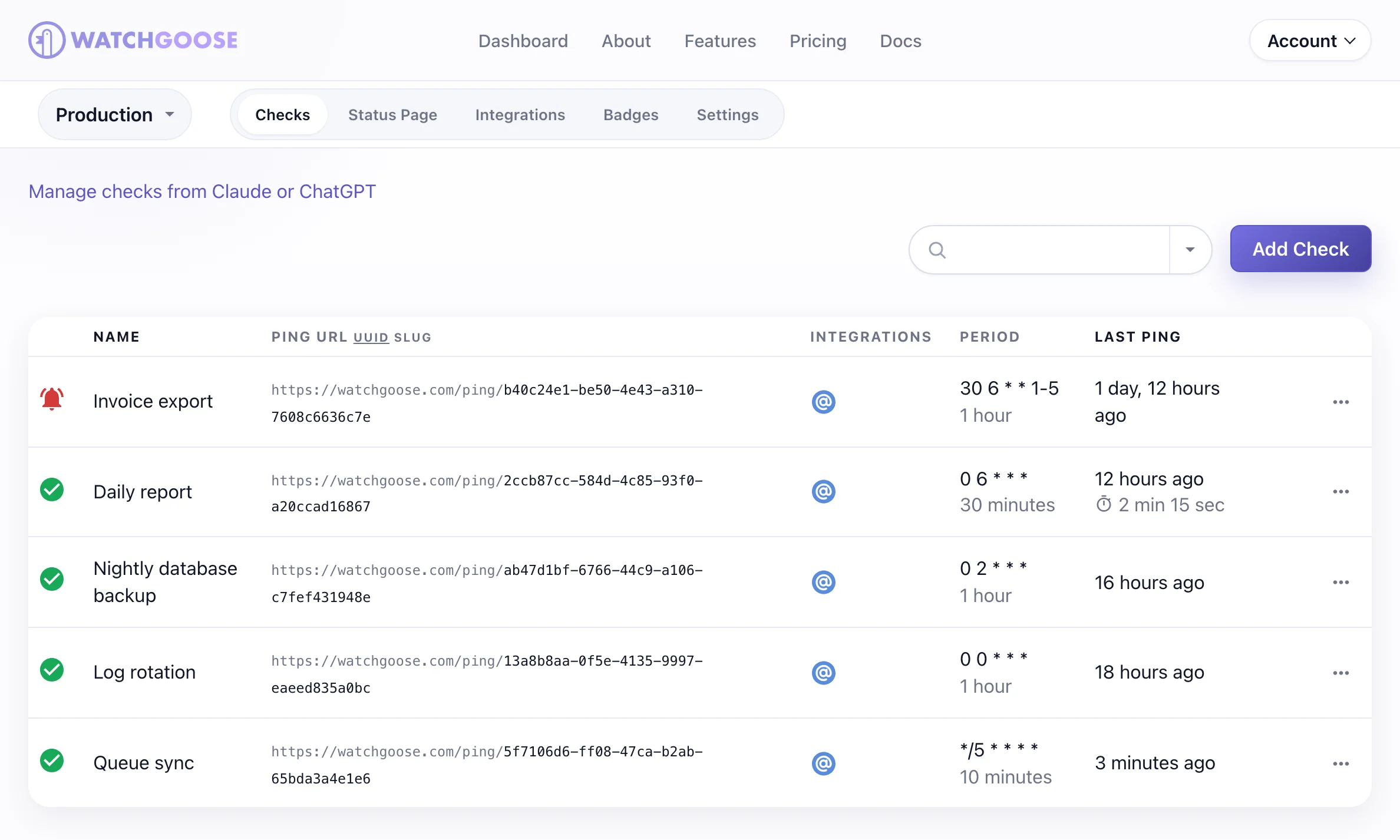
Each job sends an HTTP request, a ping, after it finishes. Watchgoose knows the job's schedule from a cron expression, a systemd OnCalendar expression or a simple interval. If the ping doesn't arrive within the grace time, Watchgoose alerts you. A job can also report a failure straight away, send its exit code, or send a start signal so Watchgoose can measure how long each run takes. This catches what uptime checks miss: the server is online, but the backup never ran.
The Free plan includes 10 checks with no credit card required, enough for the backup, the billing sync and a few daily reports. The Startup plan covers 100 checks for €17 a month and adds team access.
Alerts can go to email, Slack, Microsoft Teams, Discord, Telegram, PagerDuty, webhooks and other channels, 12+ in all. You can send low-risk jobs to an inbox and urgent ones to a team channel.
Watchgoose is also AI-ready. Its hosted Model Context Protocol (MCP) server gives AI assistants 10 tools for your checks. You can ask which jobs are late, or have the assistant set up a check for a new backup.
Each connection covers one project and starts read-only. The assistant can only create or change checks after you approve write access.
Five open source agent skills teach assistants to audit a repository's cron jobs for monitoring gaps, draft checks for one job or a whole list, review monitoring health and triage missed runs.
Official Watchgoose plugins and listings:
- Claude: Claude's connector directory, and the Watchgoose Monitoring plugin for Claude Code and Cowork.
- ChatGPT and Codex: ChatGPT's plugins directory for GPT and Codex.
- Gemini CLI: a Gemini CLI extension with the same skills.
- Cursor, VS Code and other MCP clients: setup steps in the MCP docs.
- Registries: the official MCP Registry, Raycast's MCP Registry extension, cursor.directory and npm.
Through its Open Source support program, qualifying Open Source projects and nonprofits can get a paid plan at no charge. Watchgoose also pledges 5% of profit to Open Source projects.
The tradeoff is scope. Watchgoose is built around scheduled work and success signals. If you need log search, traces, Kubernetes resource views or a full incident platform, a broader tool fits better.
Start with the two jobs that would cause the most trouble if they went silent. The cron job monitoring documentation explains the setup.
2. Healthchecks.io: A simple heartbeat monitor with a generous no-cost tier
Healthchecks.io is a long-running heartbeat monitor for cron jobs and other periodic tasks. It suits developers who want a simple ping-based check and the option to run the monitor themselves.
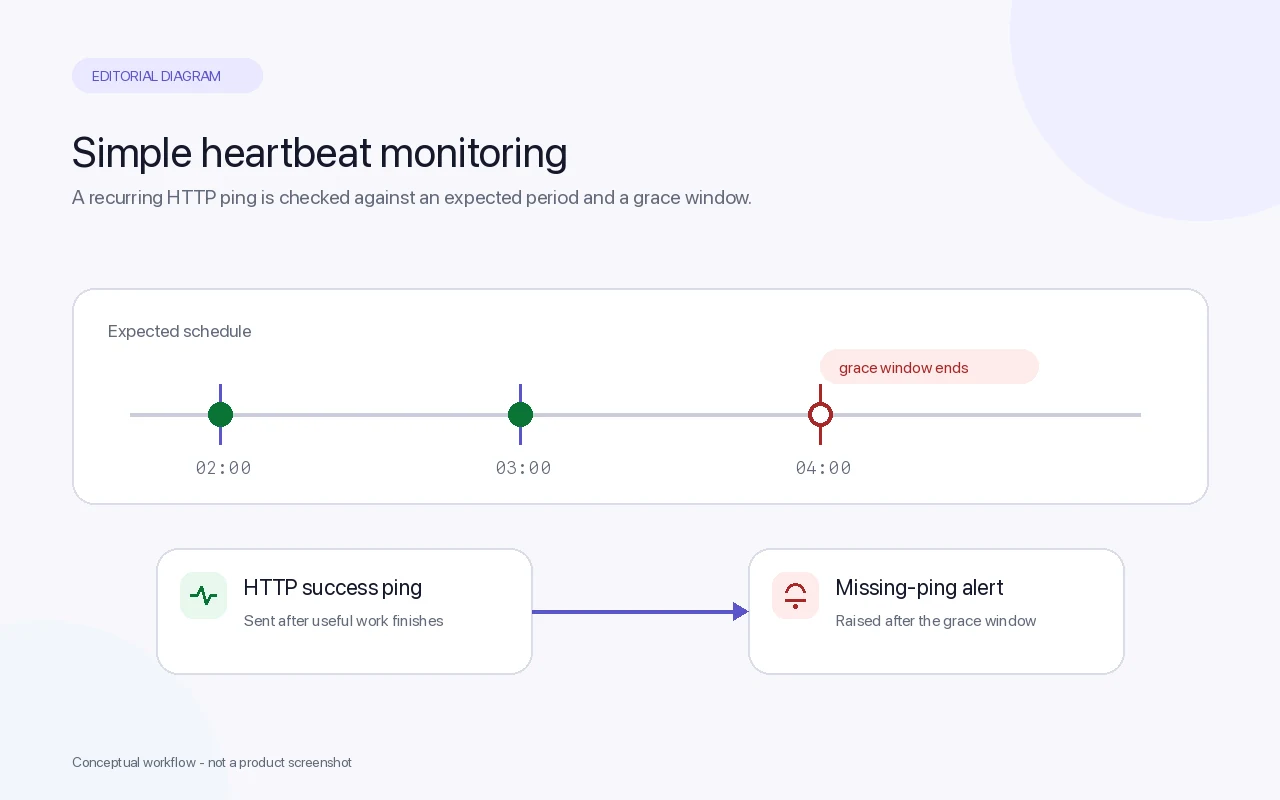
You create a check, copy its ping URL and add a curl or wget call to the cron job. Each check has a period or cron schedule and a grace time, and the service alerts you when a ping is late. Jobs can also signal a start, a failure or an exit code. Alerts go to email, webhooks, chat tools, SMS and incident-management services.
The $0 Hobbyist tier includes 20 checks and 100 log entries per check, with no time limit. The first paid tier, Supporter at $5 a month, keeps the same limits and exists to support the service. More capacity starts at $20 a month for 100 checks, with SMS, WhatsApp and phone-call credits. The code is Open Source, so you can also run your own instance if you're prepared to operate and upgrade it.
Choose Healthchecks.io when you want a proven heartbeat model with more no-cost checks, or a self-hosted option.
3. Cronitor: Schedule-aware monitoring for complex cron workloads
Cronitor is a dedicated job monitor for teams with more complex schedules. It suits developers who want duration tracking and more detail than a basic missed-ping check.
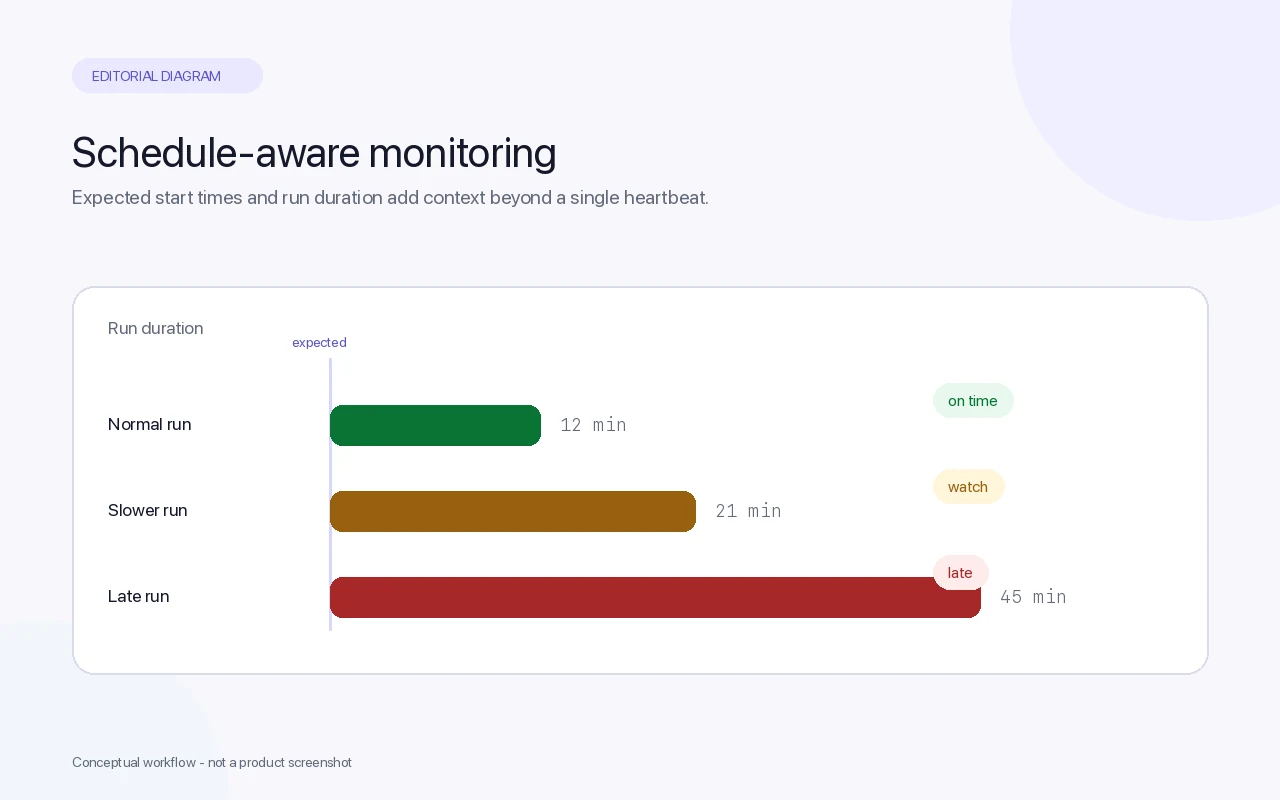
Cronitor can import existing crontab entries, which saves time on a server with a long list of scheduled commands. It tracks how long each job takes and classifies exit codes, so you can see a monthly report that used to take 12 minutes now taking 45, before it starts missing its window. It also offers language SDKs and a Kubernetes agent, and adds uptime checks and status pages.
Cronitor's $0 tier includes 5 monitors, one user, email and Slack alerts, a 5-minute fastest check interval and one basic status page. Paid usage costs $2 per monitor and $5 per user each month, with no base fee, so 20 monitors and 3 users come to $55 a month. SMS and on-call alerts need a paid account.
Choose Cronitor when timing is part of the risk, for example a data load that has to finish before the next job starts. For a handful of daily jobs, its extra detail may not solve a problem you have. The Cronitor alternative comparison covers the main differences.
4. Hyperping: Cron checks with on-call and status pages
Hyperping combines cron checks with uptime monitoring, status pages and, on paid plans, on-call scheduling, escalation and phone-call alerts. It suits growing SaaS teams that want scheduled-job alerts inside a wider customer-facing setup.
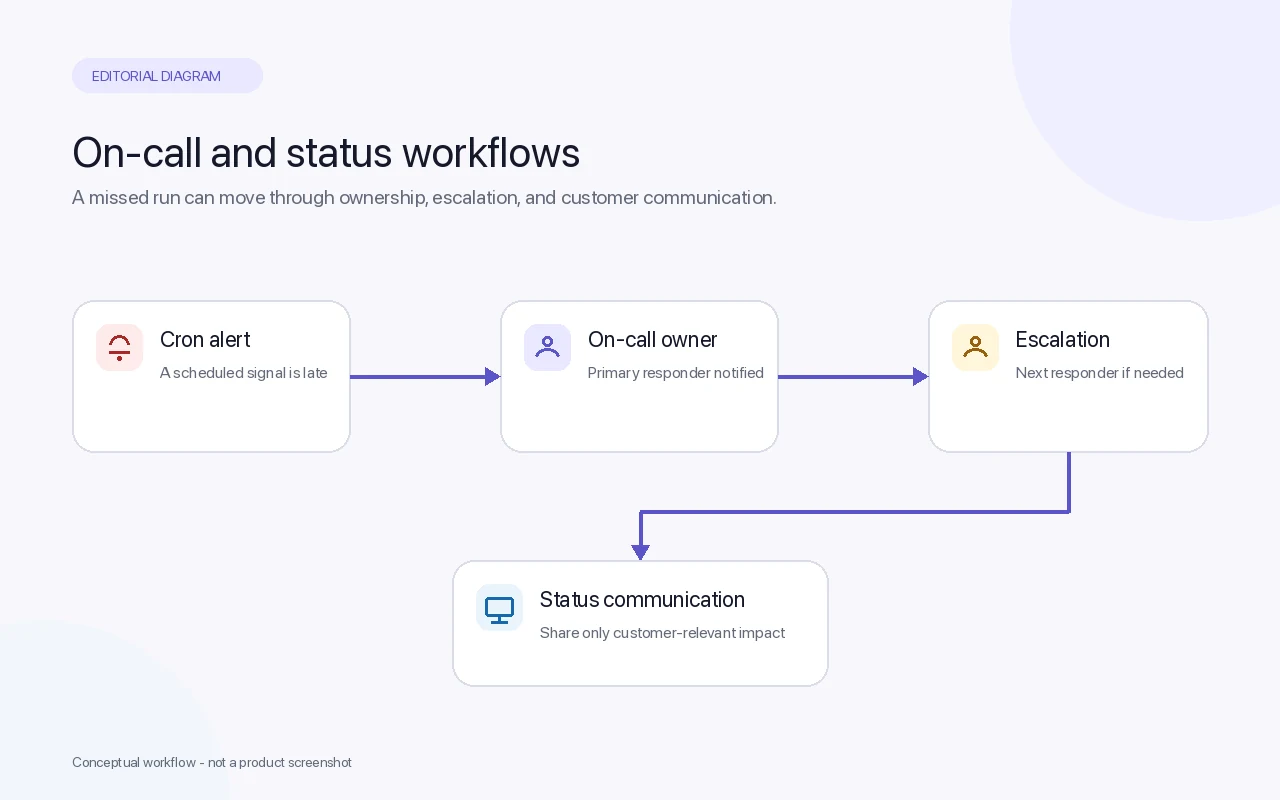
The $0 tier includes 20 monitors, which can mix cron checks with HTTP, port, ping and keyword checks, plus one basic status page, one seat and email, Slack and Microsoft Teams alerts. On-call schedules, escalation policies and phone-call alerts start with the Essentials tier at $24 a month billed yearly ($290 a year), which also raises the limit to 50 monitors and 3 seats.
On-call tools change who responds. An email says a job failed; an on-call schedule says who owns the alert right now and escalates it if nobody acknowledges it. That matters when a failed job at 3 a.m. can't wait until morning.
The cost is extra setup. A team that only needs five cron checks may not need status pages or escalation rules. Choose Hyperping when on-call ownership is the problem, not only missed runs.
5. Better Stack: Heartbeats beside logs and incident response
Better Stack puts heartbeat checks into a wider platform for uptime monitoring, logs, incidents, on-call schedules and status pages. It suits teams that want to move from a failed-job alert to related logs without changing tools.
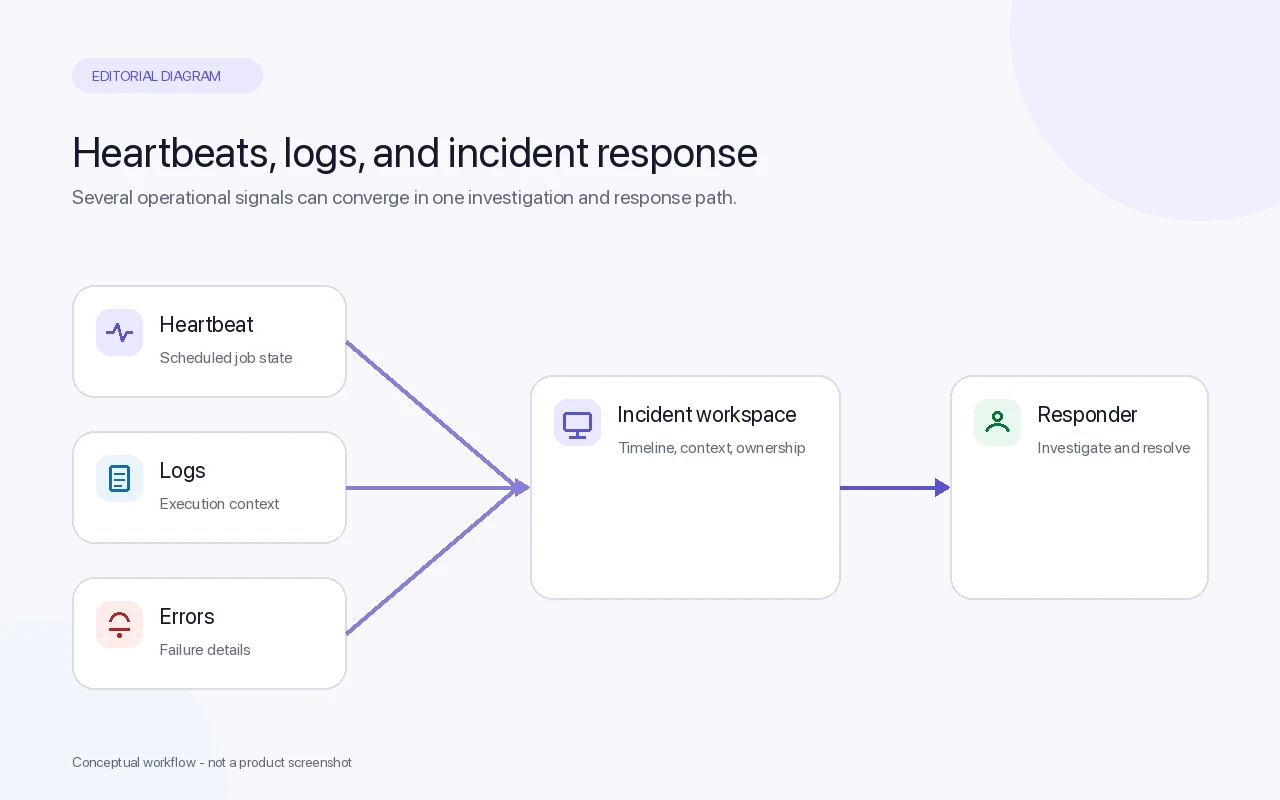
Each heartbeat has a unique URL that the job calls when it succeeds, with a configurable grace period. A script can also call a fail URL to report a failure directly. A missing heartbeat can open an incident for whoever is on call, next to the job's logs.
The $0 tier includes 10 monitors and heartbeats, one status page, and Slack and email alerts. Ten more heartbeats cost $17 a month billed yearly, or $20 billed monthly. The incident and telemetry features are priced separately per responder, at $29 a month billed yearly.
That makes Better Stack good value if you'll use the logs and on-call features, and a lot of platform if you only need to know that last night's backup ran. Check the cost of logs, seats and retention, not just the heartbeat price. The Better Stack comparison goes into more detail.
6. Sentry Crons: Cron monitoring inside your error tracker
Sentry is best known for error tracking. Its Crons feature monitors scheduled jobs in the same place, so a missed or failed run sits next to the errors and releases that might explain it.
Jobs report check-ins through Sentry's SDKs, which cover PHP and Laravel, Python and Celery, Node.js, Go, Java and Spring Boot, .NET, Ruby and Elixir, or through the Sentry CLI or plain HTTP. Sentry alerts you when a job doesn't run at its scheduled time or doesn't finish successfully.
Every Sentry plan, including the $0 Developer plan, includes one cron monitor. More monitors need a paid Sentry subscription with a pay-as-you-go budget: the Team tier costs $26 a month billed yearly ($29 monthly), and each additional monitor adds $0.78 a month, so 20 monitors come to about $15 a month on top of the subscription.
Sentry Crons makes sense if your team already lives in Sentry and wants job failures beside application errors. If you don't use Sentry, adopting it for cron monitoring alone means learning a large product for one feature.
7. UptimeRobot: Broad uptime monitoring with paid heartbeats
UptimeRobot is a widely used uptime monitor with HTTP, ping, port, keyword, SSL, DNS and heartbeat monitors, plus status pages. It suits freelancers and small teams who mainly watch websites and want scheduled-job checks in the same account.
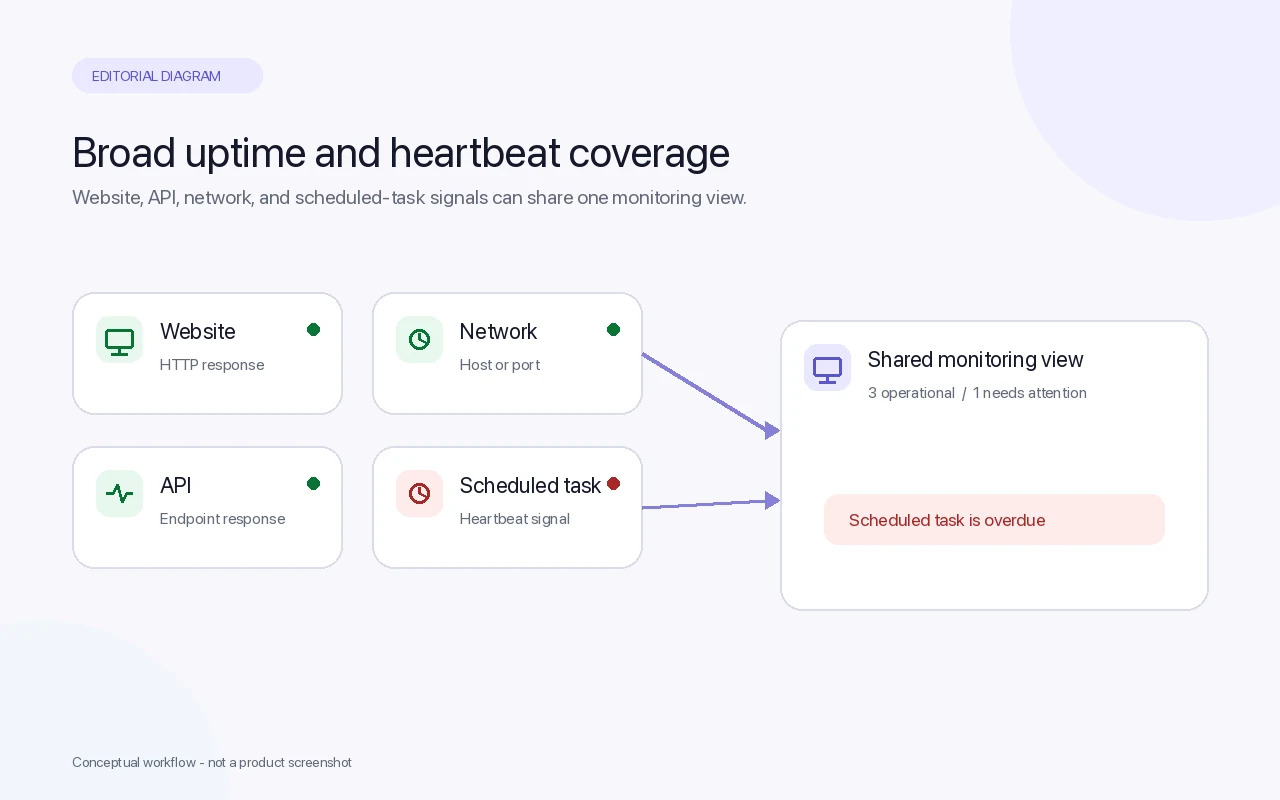
UptimeRobot's $0 tier has 50 monitors with a 5-minute interval, but it covers HTTP, port, ping and keyword checks only. Heartbeat monitoring, the kind that watches cron jobs, starts with the Solo tier, from €9 a month billed yearly (€10 monthly) for 10 monitors with a 60-second interval.
So the large free monitor count doesn't help with cron jobs. Once you pay for Solo, heartbeats work in the usual way: the job sends a signal when it finishes, and UptimeRobot alerts you when the signal goes missing. UptimeRobot doesn't parse cron schedules or analyse job timing the way Cronitor does.
UptimeRobot is a sensible choice when you already use it for websites and want one bill. If scheduled jobs are your main concern, a dedicated job monitor gives you more for less.
AI assistant and MCP support
Most cron monitors now offer an MCP server, so AI assistants such as Claude, ChatGPT and Codex can read check status or set up monitoring. What they can do varies a lot. We checked each vendor's documentation on 28 October 2026:
- Watchgoose runs a hosted MCP server with OAuth and 10 tools, limited to one approved project and read-only until you allow writes. It is listed in Claude's connector directory and ChatGPT, has plugins for Claude Code, Cowork, Codex and Gemini CLI, and includes five open source agent skills for auditing cron coverage, setting up checks and triaging missed runs.
- Cronitor runs a hosted MCP server with OAuth or an API key and 71 tools, and publishes agent skills with Claude Code and Codex plugins.
- Better Stack runs a hosted MCP server across its whole platform, including heartbeats, and is listed in Claude's directory as a connector and plugin.
- UptimeRobot runs a hosted MCP server that can create heartbeat monitors, and publishes agent skills with Claude Code, Cursor and Codex plugins.
- Hyperping runs a hosted MCP server with API keys on its paid tiers. Its tools read cron check status but don't create checks.
- Sentry's MCP server, listed in Claude's directory, can read cron monitors and recent check-ins, but not create or update them.
- Healthchecks.io has no first-party MCP server. Community-built servers use its Management API.
Pricing at a glance
Prices and allowances from each provider's pricing page, checked on 28 October 2026. Each tool name links to the page we used. Providers change them often, so check before you migrate.
Scroll horizontally to compare all columns.
| Tool | Cron monitoring at no cost | First paid step |
|---|---|---|
| Watchgoose | 10 checks, no credit card | Startup: €17 a month for 100 checks |
| Healthchecks.io | 20 checks, no time limit | Supporter: $5 a month, same limits; 100 checks from $20 a month |
| Cronitor | 5 monitors, 1 user | $2 per monitor and $5 per user each month |
| Better Stack | 10 monitors and heartbeats | 10 more heartbeats for $17 a month, billed yearly |
| Hyperping | 20 monitors, including cron checks | Essentials: $24 a month, billed yearly, adds on-call |
| Sentry Crons | 1 cron monitor | Paid subscription (Team from $26 a month, billed yearly) plus $0.78 a month per extra monitor |
| UptimeRobot | None: heartbeats are paid only | Solo: from €9 a month, billed yearly, 10 monitors |
Comparison table: Which cron monitoring tool fits your team?
The right tool depends on the failure you need to catch and the systems you already use. A large allowance helps, but it doesn't remove setup work or alert noise.
Scroll horizontally to compare all columns.
| Tool | Best fit | Strong point | Watch out for | AI assistants |
|---|---|---|---|---|
| Watchgoose | Small teams with scheduled jobs | Focused cron, backup, queue and script monitoring | No log search or traces | Hosted MCP server, five agent skills, plugins for Claude, ChatGPT, Codex and Gemini CLI |
| Healthchecks.io | Simple heartbeat checks | Clear ping model and self-hosted option | Self-hosting means running it yourself | No first-party MCP server |
| Cronitor | Complex cron schedules | Crontab import and duration tracking | Per-monitor and per-user pricing adds up | Hosted MCP server, agent skills, Claude Code and Codex plugins |
| Better Stack | Monitoring plus logs and incidents | Job alerts beside logs and on-call | Cost depends on wider usage | Hosted MCP server, in Claude's directory, Codex plugin |
| Hyperping | Teams needing on-call and status pages | Escalation and phone-call alerts | On-call only on paid tiers | Hosted MCP server on paid tiers; reads cron checks |
| Sentry Crons | Teams already using Sentry | Job failures beside application errors | One monitor included; large product to adopt | Hosted MCP server; reads cron monitors but can't create them |
| UptimeRobot | Freelancers with many websites | Broad uptime coverage | No heartbeats without a paid tier | Hosted MCP server, agent skills, Claude Code, Cursor and Codex plugins |
For a small team starting from scratch, Watchgoose is the most direct fit. Healthchecks.io is a strong alternative for a basic heartbeat model or self-hosting. Move toward Cronitor when schedule detail matters, and toward Better Stack, Hyperping or Sentry when logs, on-call or error tracking are already on the list.
What to look for in cron job monitoring for a small team
Start with the jobs that run without anyone watching: backups, reports, cleanup, data syncs and long-running processing. Schedule-driven tasks differ from event-driven tasks, which helps you decide what should send a recurring success signal.
A good monitor should answer four questions quickly:
- Did the job run?
- Did it finish successfully?
- Was it late?
- Who will act if it fails?
Send the signal after the useful work finishes. A ping at the start of a script only proves that the script began. For a backup, the signal belongs after the backup result is known; for a queue worker, after the batch has been processed.
Set the grace time longer than the job's normal run time, with room for ordinary variation. Too tight and you get false alarms; too long and a real failure reaches you late. Test it by forcing a safe failure before you trust it with a production backup.
Count maintenance as part of the price. Self-hosted or observability-heavy options can cost nothing in licences and still take engineering time, infrastructure, alert rules and upgrades.
Check the alert paths. Email may be enough for a low-risk report and Slack for shared review, while a failed billing or backup job may need an escalation path. The Watchgoose notification documentation covers the options.
Finally, monitor the outcome, not only the process. A command that exits successfully can still produce an empty file or stale data. Where you can, check the expected output before sending the success signal.
Frequently asked questions
What is the best cron job monitoring tool for small teams?
Watchgoose is the best starting point for small teams that need focused monitoring for cron jobs, backups, queues or scripts. It has a no-cost allowance, nothing to install and alerts for missed or failed runs. Healthchecks.io is a good alternative for a simple heartbeat setup, Cronitor suits complex schedules, and Better Stack, Hyperping or Sentry fit teams that want cron checks inside a wider platform.
How does cron job monitoring work?
Cron job monitoring usually works by sending a heartbeat after a scheduled task succeeds. The monitor expects that signal at a set time. If it does not arrive within the grace window, the monitor sends an alert. This catches silent failures even when the server itself remains online.
Which cron monitoring tools can I use at no cost?
As of October 2026, Watchgoose, Healthchecks.io (20 checks), Cronitor (5 monitors), Better Stack (10 monitors and heartbeats), Hyperping (20 monitors) and Sentry (1 cron monitor) all include cron or heartbeat monitoring at no cost. UptimeRobot's no-cost tier doesn't include heartbeat monitoring.
Which cron monitoring tools work with Claude and ChatGPT?
As of October 2026, Watchgoose, Cronitor, Better Stack, UptimeRobot, Hyperping and Sentry run hosted MCP servers that AI assistants can connect to. Watchgoose, Better Stack and Sentry are listed in Claude's connector directory. Watchgoose also has plugins for ChatGPT, Codex and Gemini CLI with five cron-monitoring skills. Healthchecks.io has no first-party MCP server.
Is a free cron monitor enough for a small team?
A free cron monitor is often enough when you have a short list of high-value jobs. Start with backups, billing tasks, data syncs and customer reports. Check the alert channels and limits before relying on it, and make sure the tool can follow your jobs' real schedules.
Should I use uptime monitoring or cron monitoring?
Use cron monitoring for scheduled work and uptime monitoring for services that should respond to requests. A website can be online while its nightly export fails, so uptime alone cannot cover both risks. Teams that need both may choose a broader platform, but small teams often get clearer alerts by keeping the job check focused.
Where should I place the success ping in a cron script?
Place the success ping after the task has completed and its result is known. If you put it at the start, a script can report success before the backup, export, or sync fails. For important jobs, also check that the expected output exists and contains usable data before sending the final signal.
Conclusion
Choose Watchgoose if your team needs a focused, low-maintenance way to catch missed cron jobs and failed scheduled tasks. Start with one backup and one business-critical job, then test the alert path with a safe failure signal. If you later need logs, on-call schedules or full infrastructure views, you can reassess with a clear record of what the job monitor already covers.
For setup details on specific schedules, see how to run a cron job every 5 minutes, crontab syntax and examples and scheduling jobs with node-cron.