
Monitor PostgreSQL pg_dump and pgBackRest Backups: Catch Silent Failures
The worst PostgreSQL backup failure is one that exits 0. Run pg_dump mydb | gzip > /backups/mydb.sql.gz in a cron job without pipefail and an authentication error, dropped connection, or full temp directory will make pg_dump fail while gzip compresses zero bytes and returns exit code 0. If your monitoring checks only that the cron line ran, you can collect empty 20-byte .sql.gz files for months without a single alert.
A reliable backup script prevents false greens before it ever sends a heartbeat: write to a temporary file, check both pg_dump's exit code and archive readability (pg_restore --list), move the finished dump into place atomically, and only then ping Watchgoose. If the dump fails, exits non-zero, or never starts because the server rebooted or cron stopped, Watchgoose alerts you.
Four ways PostgreSQL cron backups fail silently
- The shell pipe masks
pg_dumperrors. In POSIX/bin/sh(which cron uses by default on Debian and Ubuntu),pg_dump mydb | gzip > out.sql.gzreturns the exit code ofgzip, notpg_dump. Even with&& curl ..., the success ping still fires on a failed dump. - A partial dump overwrites yesterday's good backup. Writing straight to
/backups/prod.dumptruncates the previous good file the momentpg_dumpstarts. If the disk fills up halfway through, you lose both tonight's backup and yesterday's. - Missing
.pgpasspermissions or peer-auth mismatch.pg_dumprefuses to read a.pgpassfile that is group- or world-readable (chmod 600is mandatory), and cron runs with a different user or environment than your interactive shell. - The backup host never ran cron at all. A rebooted VM, stopped cron daemon, or paused systemd timer prevents the job from running, leaving no error in local logs and no alert email.
Cron email vs local disk checks vs Watchgoose heartbeat
Scroll horizontally to see all columns.
| Failure mode | Local cron mail | Simple && curl on pipe | Safe wrapper + Watchgoose |
|---|---|---|---|
pg_dump auth/connection error in a pipe | Only if MTA configured | Falsely reports OK | Caught; sends non-zero exit + sanitized stderr |
| Empty file or corrupt archive header | Missed | Missed | Caught by non-empty check and pg_restore --list (full data corruption still requires a restore test) |
| Disk fills up mid-dump | Often fails to queue mail too | Usually missed | Immediate /fail ping; old backup preserved |
| Backup hangs on a table lock | No | No | Caught by /start grace window |
| Host down or cron stopped | No | No | Overdue alert after grace ends |
Missed-run alerts in Watchgoose arm after the check receives its first successful ping. Explicit failure pings and /start runtime timeouts can alert before that.
Step 1: Create a Watchgoose check for your nightly dump
Create a free Watchgoose account (includes up to 10 checks, no credit card required), then create a check named postgres / nightly-pg-dump.
Scroll horizontally to see all columns.
| Setting | Cron job | Watchgoose check |
|---|---|---|
| Schedule | 0 3 * * * | Cron: 0 3 * * * |
| Time zone | UTC | UTC |
| Grace time | Typical dump takes 8 minutes | 30 minutes (overdue at 03:30 UTC) |
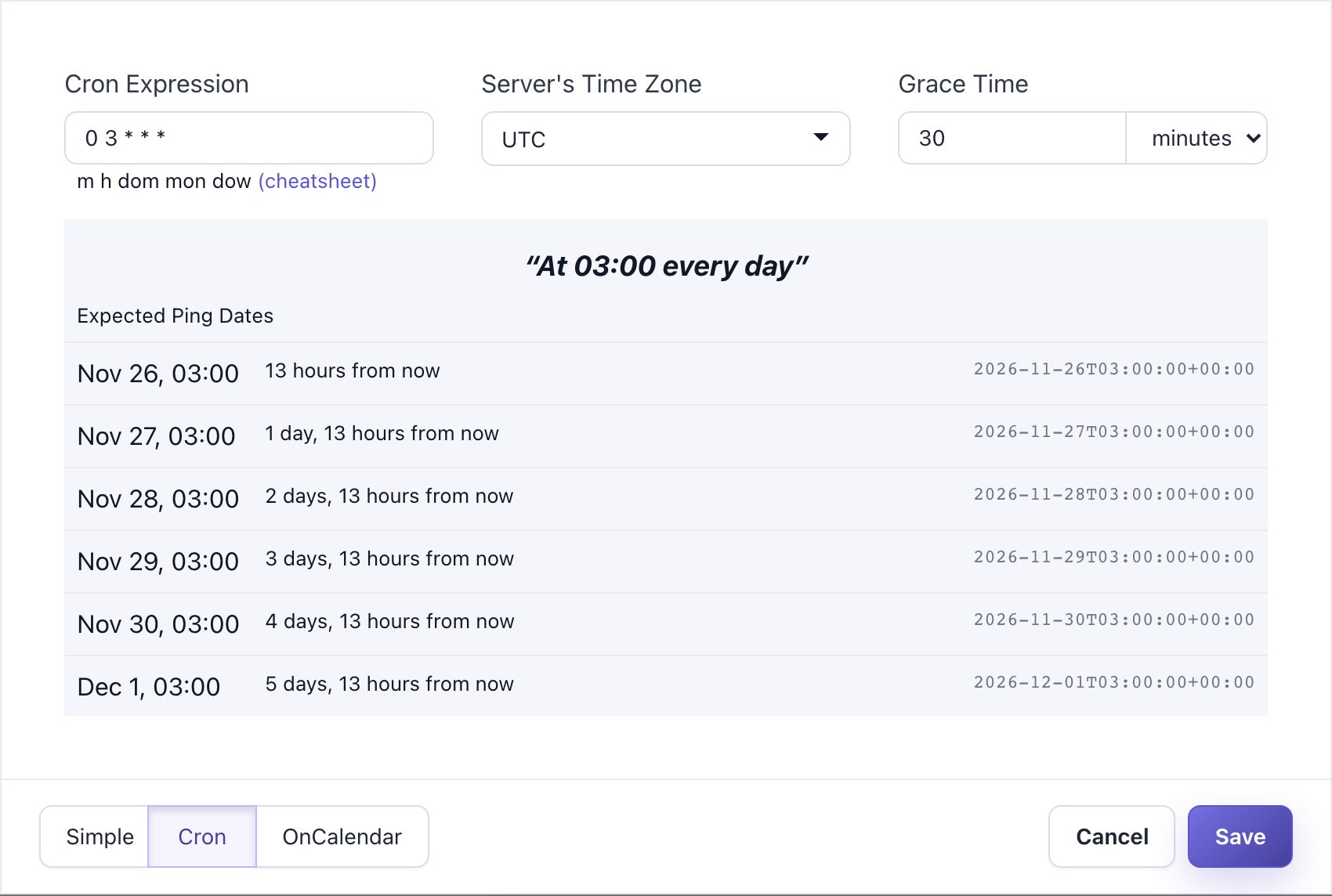
Connect your alert channels (Slack, Microsoft Teams, Discord, PagerDuty, or email) and verify alerts are enabled on the check.
Step 2: Store PostgreSQL and Watchgoose credentials safely
Never put PGPASSWORD=... or your Watchgoose ping URL directly in a crontab line, where any local user can see them in ps output or backups of /var/spool/cron.
As the dedicated backup user (for example pgbackup), create a .pgpass file and a private Watchgoose URL file:
mkdir -p -m 700 "$HOME/.config/watchgoose"
(umask 077; touch "$HOME/.pgpass" "$HOME/.config/watchgoose/pg-dump.url")
chmod 600 "$HOME/.pgpass" "$HOME/.config/watchgoose/pg-dump.url"
Put your read-only PostgreSQL backup credentials in ~/.pgpass (format hostname:port:database:username:password):
127.0.0.1:5432:app_prod:pgbackup:replace-with-strong-password
Put the single-line Watchgoose ping URL (no trailing blank line) in ~/.config/watchgoose/pg-dump.url:
https://watchgoose.com/ping/00000000-0000-0000-0000-000000000000
Step 3: Use a safe pg_dump custom-format backup script
Using PostgreSQL's custom format (--format=custom, -Fc) compresses the dump internally without a shell pipe, supports selective or parallel pg_restore, and lets you verify the archive table of contents with pg_restore --list before declaring success.
Save this script as /usr/local/bin/pg-dump-watchgoose.sh and make it executable (chmod 755 /usr/local/bin/pg-dump-watchgoose.sh):
#!/usr/bin/env bash
set -uo pipefail

DB_HOST="${PGHOST:-127.0.0.1}"
DB_PORT="${PGPORT:-5432}"
DB_NAME="${PGDATABASE:?Set PGDATABASE}"
DB_USER="${PGUSER:-pgbackup}"
BACKUP_DIR="${BACKUP_DIR:-/var/backups/postgresql}"
RETENTION_DAYS="${RETENTION_DAYS:-14}"
URL_FILE="${WATCHGOOSE_URL_FILE:-$HOME/.config/watchgoose/pg-dump.url}"

ping_url=""
if [ -r "$URL_FILE" ]; then
    IFS= read -r ping_url < "$URL_FILE" || true
fi

ping_wg() {
    local suffix="$1"
    local log_file="${2:-}"
    [ -n "$ping_url" ] || return 0
    if [ -n "$log_file" ] && [ -s "$log_file" ]; then
        tail -c 4096 "$log_file" | curl --disable --silent --fail --globoff \
            --connect-timeout 3 --max-time 10 --retry 3 --retry-max-time 20 \
            -A "pg-dump-${DB_NAME}" \
            --data-binary @- --output /dev/null --config /dev/fd/3 3<<EOF 2>/dev/null || true
url = "${ping_url%/}/${suffix}"
EOF
    else
        curl --disable --silent --fail --globoff \
            --connect-timeout 3 --max-time 10 --retry 3 --retry-max-time 20 \
            -A "pg-dump-${DB_NAME}" \
            --output /dev/null --config /dev/fd/3 3<<EOF 2>/dev/null || true
url = "${ping_url%/}/${suffix}"
EOF
    fi
}

mkdir -p "$BACKUP_DIR"
stamp="$(date -u +%Y%m%dT%H%M%SZ)"
tmp_dump="$(mktemp "${BACKUP_DIR}/.${DB_NAME}-${stamp}.XXXXXX.dump")"
err_log="$(mktemp)"
final_dump="${BACKUP_DIR}/${DB_NAME}-${stamp}.dump"

cleanup() {
    rm -f "$tmp_dump" "$err_log"
}
trap cleanup EXIT

ping_wg "start"

pg_dump \
    --host="$DB_HOST" \
    --port="$DB_PORT" \
    --username="$DB_USER" \
    --no-password \
    --format=custom \
    --compress=6 \
    --lock-wait-timeout=60000 \
    --file="$tmp_dump" \
    "$DB_NAME" 2>"$err_log"
rc=$?
if [ "$rc" -ne 0 ]; then
    ping_wg "$rc" "$err_log"
    exit "$rc"
fi

# Verify archive structure and non-zero size before moving into place.
if [ ! -s "$tmp_dump" ] || ! pg_restore --list "$tmp_dump" >/dev/null 2>>"$err_log"; then
    echo "pg_restore archive verification failed for ${DB_NAME}" >>"$err_log"
    ping_wg "fail" "$err_log"
    exit 1
fi

mv "$tmp_dump" "$final_dump"
find "$BACKUP_DIR" -maxdepth 1 -type f -name "${DB_NAME}-*.dump" -mtime "+${RETENTION_DAYS}" -delete

size_bytes="$(wc -c < "$final_dump" | tr -d ' ')"
printf 'backup=%s bytes=%s\n' "$(basename "$final_dump")" "$size_bytes" >"$err_log"
ping_wg "0" "$err_log"
Notice three safeguards built into the script:
--lock-wait-timeout=60000stopspg_dumpfrom hanging indefinitely behind a longALTER TABLEor exclusive lock; after 60 seconds it fails cleanly and sends/failwith the exact PostgreSQL lock error.--no-passwordguaranteespg_dumpfails immediately instead of blocking on a password prompt if.pgpassis missing or has wrong permissions.- Atomic
mvafterpg_restore --listmeans a failed or half-written dump never pollutes/var/backups/postgresqland never deletes old backups.
Schedule it in the pgbackup user's crontab (with flock so a slow dump never overlaps itself):
0 3 * * * /usr/bin/flock -n /tmp/pg-dump-app_prod.lock env PGDATABASE=app_prod /usr/local/bin/pg-dump-watchgoose.sh
If you also copy dumps off-host with rclone, restic, or borgmatic, monitor the off-host upload step too (see the rclone, restic, and borgmatic guides).
If you need plain SQL with gzip: guard against the pipe trap
If a downstream workflow requires plain .sql.gz files instead of -Fc, run under bash with set -o pipefail and test the gzip archive before pinging Watchgoose:
#!/usr/bin/env bash
set -uo pipefail

pg_dump --no-password --lock-wait-timeout=60000 "$PGDATABASE" 2>"$err_log" \
    | gzip -c >"$tmp_gz"
pipe_rc=$?

if [ "$pipe_rc" -ne 0 ] || [ ! -s "$tmp_gz" ] || ! gzip -t "$tmp_gz" 2>>"$err_log"; then
    ping_wg "fail" "$err_log"
    exit 1
fi
Never write this pipeline in /bin/sh (where pipefail is absent on Debian/Ubuntu dash) without checking each command's exit status explicitly.
Monitoring pgBackRest backups and WAL archiving
For multi-gigabyte PostgreSQL databases or point-in-time recovery (PITR), pgBackRest replaces pg_dump with physical backups plus continuous WAL archiving. You have two things to monitor:
- Scheduled full and differential backups: Wrap
pgbackrest --stanza=main --type=diff backup(and your weekly--type=fullrun) with a Watchgoose check each.pgBackRestexits0on success and non-zero on failure. - Continuous WAL archiving health: A broken
archive_commandcan fillpg_waland take PostgreSQL offline even though last night's base backup succeeded. Schedulepgbackrest --stanza=main checkevery hour on its own Watchgoose check:
#!/usr/bin/env bash
set -uo pipefail
URL_FILE="$HOME/.config/watchgoose/pgbackrest-check.url"
IFS= read -r ping_url < "$URL_FILE" || ping_url=""

err_log="$(mktemp)"
trap 'rm -f "$err_log"' EXIT

if pgbackrest --stanza=main check >"$err_log" 2>&1; then
    rc=0
else
    rc=$?
fi

if [ -n "$ping_url" ]; then
    tail -c 4096 "$err_log" | curl --disable --silent --fail --globoff \
        --connect-timeout 3 --max-time 10 --retry 3 --retry-max-time 20 \
        -A "pgbackrest-main-check" \
        --data-binary @- --output /dev/null --config /dev/fd/3 3<<EOF 2>/dev/null || true
url = "${ping_url%/}/${rc}"
EOF
fi
exit "$rc"
pgbackrest check verifies both the repository accessibility and that a real WAL segment archives cleanly through archive_command.
Step 4: Test both a healthy dump and a forced failure
Run the script once as the pgbackup user against your real database:
PGDATABASE=app_prod /usr/local/bin/pg-dump-watchgoose.sh
Check the Events view in Watchgoose: confirm Started and OK appear with the backup filename and byte size, and that the check transitions from New to Up.
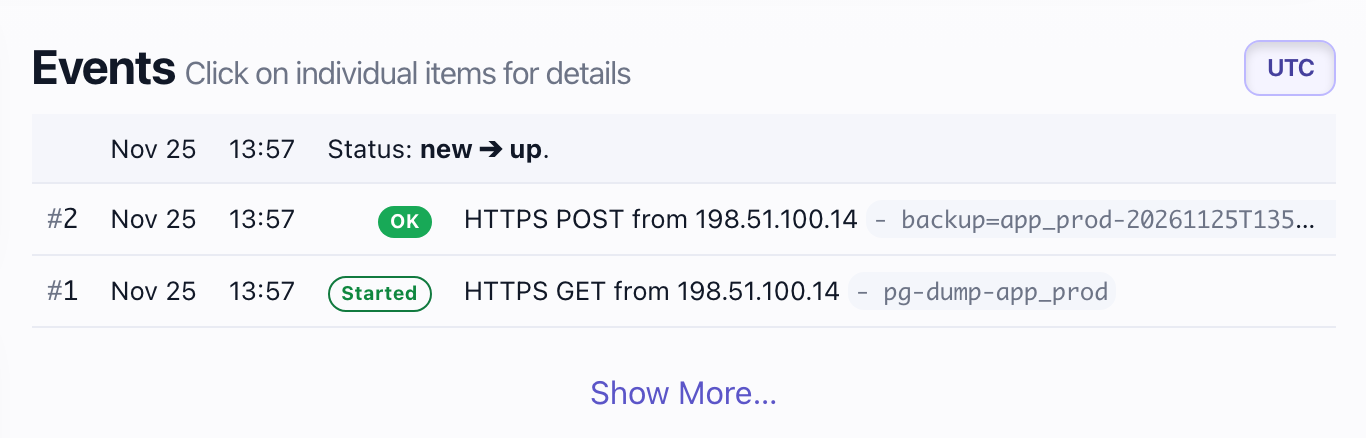
Then test the failure path against a nonexistent database name (using a temporary check or right before going live) to confirm your alert channel receives the error detail:
PGDATABASE=nonexistent_test_db /usr/local/bin/pg-dump-watchgoose.sh
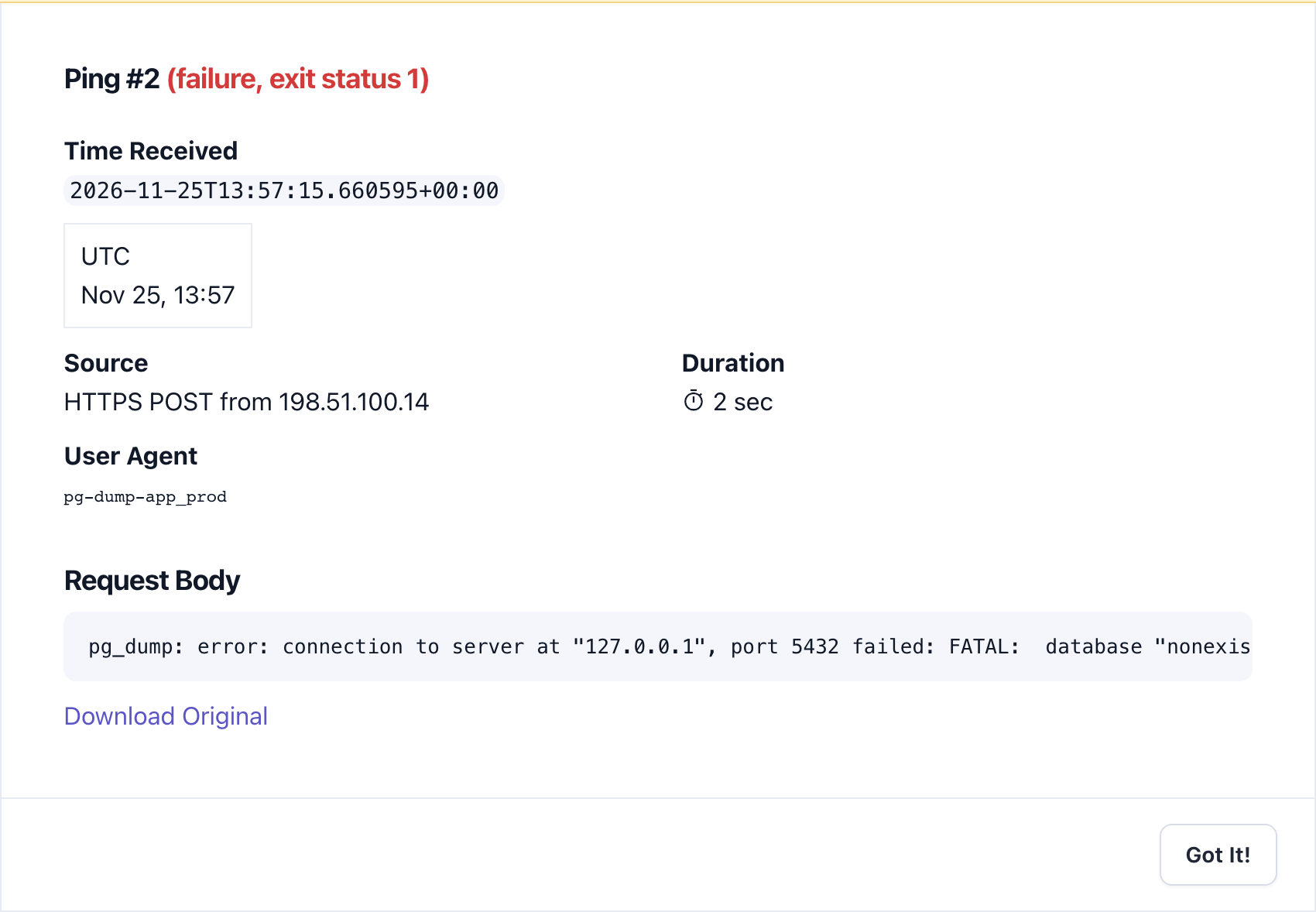
After testing the failure path, run one clean backup against app_prod so the check returns to Up.
What a backup heartbeat proves (and what it does not)
A Watchgoose success ping combined with pg_restore --list proves that pg_dump ran on schedule, exited 0, wrote a non-empty file, and produced a valid custom-format header. It does not prove that your application still boots cleanly from that dump, that extensions or roles match on a fresh host, or that off-host storage permissions allow downloads. Schedule a periodic automated restore test into a disposable PostgreSQL instance (and monitor that restore job with its own Watchgoose check) to verify end-to-end recoverability.
Frequently asked questions
Why does pg_dump | gzip exit 0 even when pg_dump fails?
In standard POSIX /bin/sh (and in bash without set -o pipefail), a pipeline's exit status is the exit status of its last command. When pg_dump fails and writes nothing to stdout, gzip compresses an empty stream and exits 0. Use pg_dump --format=custom (no pipe required) or run in bash with set -o pipefail.
Does pg_restore --list slow down a large PostgreSQL backup?
No. pg_restore --list reads only the table of contents inside a custom-format (-Fc) archive, not the compressed table data, so it typically finishes in under a second even on multi-gigabyte dumps while still catching empty, non-archive, or corrupt-header files (catching truncation inside compressed table data still requires a full restore test).
Should I put PGPASSWORD in my crontab for pg_dump?
No. Environment variables on a crontab line are visible in cron logs and system backups, and passing passwords on the command line exposes them in ps. Store credentials in a chmod 600 ~/.pgpass file (or use peer/certificate authentication) and pass --no-password to pg_dump.
How big should the Watchgoose grace period be for a PostgreSQL backup?
Set the grace period to at least two to three times your normal dump duration so gradual database growth does not trigger noisy late-night alerts. Watchgoose records each run's duration when you send /start, which makes it easy to spot a backup creeping toward its grace limit.
Can Watchgoose alert if pgBackRest WAL archiving breaks between nightly backups?
Yes. Schedule pgbackrest --stanza=main check hourly and ping a separate Watchgoose check with its exit code. If archive_command fails or repository storage becomes unreachable, pgbackrest check exits non-zero and Watchgoose alerts you before pg_wal fills the disk.