
Kubernetes CronJob Monitoring: Catch Failed, Stuck, and Skipped Jobs
Kubernetes CronJobs do not send alerts when a pod crashes, gets OOMKilled, or stops being scheduled altogether. A CronJob can look healthy in kubectl get cronjobs while quietly skipping every nightly run because a previous Job never terminated under concurrencyPolicy: Forbid, someone left spec.suspend: true on after maintenance, or ImagePullBackOff / quota errors prevented pods from starting.
If you already operate Prometheus, kube-state-metrics, and Alertmanager, you can build PromQL rules for failed and overdue CronJobs. Even then, cluster-side alerting breaks if the monitoring stack or cluster itself is unhealthy. Adding an outbound heartbeat ping to Watchgoose from the job container catches crashes, timeouts, skipped schedules, and cluster-wide outages without giving an external tool RBAC access to your cluster.
Diagnose a Kubernetes CronJob that stopped running
Before adding external monitoring, check why an existing CronJob missed its schedule. Run these four commands against the CronJob's namespace (-n billing in the examples below):
kubectl -n billing get cronjob nightly-billing -o wide
Look at SUSPEND, ACTIVE, and LAST SCHEDULE. If SUSPEND is True, the controller will not create any Jobs until you patch spec.suspend back to false. If ACTIVE is 1 and concurrencyPolicy is Forbid, an older hung Job is blocking every new run.
Next, inspect controller events for skipped schedules or deadline errors:
kubectl -n billing describe cronjob nightly-billing
Watch for Warning events such as TooManyMissedTimes (recorded when more than 100 missed schedules accumulate during catch-up) and Normal JobAlreadyActive events (Not starting job because prior execution is running and concurrency policy is Forbid). Then list recent Jobs and check their pod termination reasons:
kubectl -n billing get jobs --sort-by=.metadata.creationTimestamp
kubectl -n billing get pods -l job-name=<latest-job-name> \
  -o jsonpath='{range .items[*]}{.metadata.name}{" "}{.status.phase}{" "}{.status.containerStatuses[0].state.terminated.reason}{" exit="}{.status.containerStatuses[0].state.terminated.exitCode}{"\n"}{end}'
An OOMKilled termination with exit=137 means the container exceeded its memory limit; DeadlineExceeded on the Job means it hit activeDeadlineSeconds. Finally, check container logs if the pod started:
kubectl -n billing logs job/<latest-job-name> --tail=100
If no pod was ever created (for example, FailedCreate due to a missing ServiceAccount, ResourceQuota exhaustion, or an invalid image pull secret), check kubectl -n billing get events --sort-by=.lastTimestamp.
Prometheus and kube-state-metrics vs external heartbeat monitoring
Scroll horizontally to see all columns.
| Failure mode | kubectl / Job history | Prometheus + kube-state-metrics | Watchgoose heartbeat |
|---|---|---|---|
| Container exits non-zero | Recorded until failedJobsHistoryLimit | Yes (via kube_job_status_failed rule) | Yes (immediate exit-code ping) |
Container OOMKilled (exit 137) | Pod terminated with 137 | Yes (with pod alert rules) | Yes (overdue alert after grace ends) |
Blocked by concurrencyPolicy: Forbid or suspend: true | Silent unless inspected | Only if you maintain per-CronJob staleness PromQL | Yes (overdue alert after grace ends) |
ImagePullBackOff or FailedCreate quota error | Silent in events | Requires extra pod/quota rules | Yes (overdue alert after grace ends) |
| Cluster or monitoring namespace down | No | No (unless paired with external dead-man alert) | Yes (monitored from outside the cluster) |
Missed-run alerts in Watchgoose start after the check receives its first successful ping. Explicit exit-code failures and /start runtime timeouts can alert before that.
Step 1: Create a Watchgoose check matching your CronJob schedule
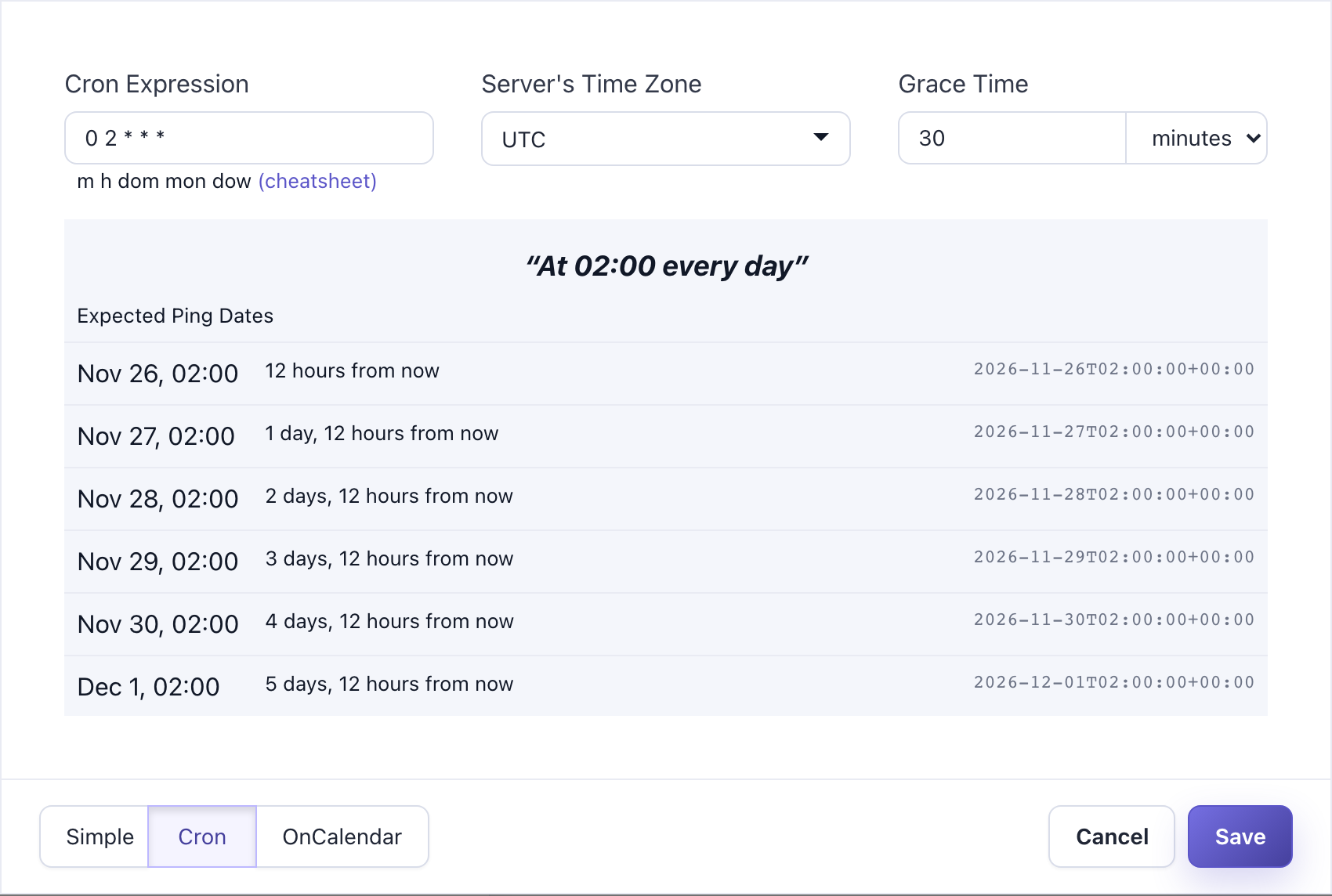
Create a free Watchgoose account (includes up to 10 checks, no credit card required), then create a check named prod-k8s / nightly-billing.
Scroll horizontally to see all columns.
| Setting | Kubernetes CronJob | Watchgoose check |
|---|---|---|
| Schedule | schedule: "0 2 * * *" | Cron: 0 2 * * * |
| Time zone | timeZone: "UTC" (K8s 1.27+ GA) | UTC |
| Grace time | Image pull + 10-minute job + retries | 30 minutes (overdue at 02:30 UTC) |
Match spec.timeZone in Kubernetes with Watchgoose's time zone setting. If you omit spec.timeZone in Kubernetes, the CronJob controller uses the kube-controller-manager local time zone (UTC on EKS, GKE, and AKS, though self-managed clusters sometimes differ). Setting timeZone: "UTC" explicitly removes ambiguity.
Attach your notification channels (Slack, Microsoft Teams, Discord, PagerDuty, or email) and keep staging clusters pointed at separate checks.
Step 2: Store the ping URL in a Kubernetes Secret
Store the private ping URL in a Kubernetes Secret inside the CronJob's namespace rather than in plaintext YAML or a ConfigMap:
kubectl -n billing create secret generic watchgoose-nightly-billing \
  --from-literal=ping-url='https://watchgoose.com/ping/00000000-0000-0000-0000-000000000000'
If you manage secrets with External Secrets Operator, Sealed Secrets, or SOPS, store the same ping-url key there so nothing sensitive enters Git.
Step 3: Wrap the CronJob command and configure deadlines
The batch/v1 CronJob below injects the Secret into WATCHGOOSE_https://watchgoose.com/ping/your-uuid-here, passes the URL to curl over stdin (--config -) so it never appears in container process arguments, sends /start before the job runs, and reports the job's exact numeric exit code (/0 on success, /1../255 on failure):
apiVersion: batch/v1
kind: CronJob
metadata:
  name: nightly-billing
  namespace: billing
spec:
  schedule: "0 2 * * *"
  timeZone: "UTC"
  concurrencyPolicy: Forbid
  startingDeadlineSeconds: 600
  successfulJobsHistoryLimit: 3
  failedJobsHistoryLimit: 3
  jobTemplate:
    spec:
      activeDeadlineSeconds: 1500
      backoffLimit: 0
      ttlSecondsAfterFinished: 86400
      template:
        spec:
          restartPolicy: Never
          containers:
            - name: billing
              image: ghcr.io/example/billing-worker:2026.11
              env:
                - name: WATCHGOOSE_https://watchgoose.com/ping/your-uuid-here
                  valueFrom:
                    secretKeyRef:
                      name: watchgoose-nightly-billing
                      key: ping-url
              command:
                - /bin/sh
                - -c
                - |
                  ping() {
                    [ -n "${WATCHGOOSE_https://watchgoose.com/ping/your-uuid-here:-}" ] || return 0
                    curl --disable --silent --fail --globoff \
                      --connect-timeout 3 --max-time 10 --retry 3 --retry-max-time 20 \
                      -A "k8s-nightly-billing" \
                      --output /dev/null --config - <<EOF 2>/dev/null || true
                  url = "${WATCHGOOSE_https://watchgoose.com/ping/your-uuid-here%/}/$1"
                  EOF
                  }
                  ping start
                  /app/run-billing
                  rc=$?
                  ping "$rc"
                  exit "$rc"
              resources:
                requests:
                  cpu: "250m"
                  memory: "256Mi"
                limits:
                  memory: "512Mi"
Pay close attention to three Kubernetes Job fields that prevent silent lockups:
activeDeadlineSeconds: 1500(25 minutes) terminates a hung Job before the next run starts. Without it, a single deadlocked pod underconcurrencyPolicy: Forbidblocks every future schedule forever.startingDeadlineSeconds: 600(10 minutes) tells the CronJob controller to count missed schedules only within the last 10 minutes instead of back to the last scheduled run, and skips starting a delayed Job if more than 10 minutes have elapsed since its intended time. Without it, a brief controller outage can accumulate more than 100 missed runs and logTooManyMissedTimeswarnings while skipping historical catch-up runs.- Keep
NetworkPolicyegress open towatchgoose.com:443. If your namespace applies a default-deny egressNetworkPolicy, allow HTTPS (443/TCP) and DNS (53/UDP,53/TCP) for the CronJob pods, or Watchgoose pings will time out. Even if egress is blocked, the|| trueguard ensures your billing command still executes and exits with its real status.
Distroless images: Ping from Python without curl or a shell
Many production Kubernetes images are distroless or Alpine minimal builds with no curl or /bin/sh. Calling Watchgoose directly from your worker process also gives you clean SIGTERM handling when Kubernetes sends a termination signal at activeDeadlineSeconds.
In Python (standard library only, zero extra packages), wrap your main entrypoint like this:
import os
import signal
import sys
import time
import urllib.error
import urllib.request


def ping_watchgoose(suffix: str, body: str = "") -> None:
    base_url = os.environ.get("WATCHGOOSE_https://watchgoose.com/ping/your-uuid-here", "").strip().rstrip("/")
    if not base_url:
        return
    url = f"{base_url}/{suffix}"
    data = body.encode("utf-8")[:4096] if body else None
    req = urllib.request.Request(
        url,
        data=data,
        method="POST" if data else "GET",
        headers={"User-Agent": "k8s-nightly-billing"},
    )
    for attempt in range(3):
        try:
            with urllib.request.urlopen(req, timeout=10):
                return
        except (urllib.error.URLError, TimeoutError, OSError):
            if attempt < 2:
                time.sleep(2**attempt)


def main() -> int:
    def _handle_sigterm(_signum: int, _frame: object) -> None:
        ping_watchgoose("fail", "Received SIGTERM from Kubernetes")
        sys.exit(143)

    signal.signal(signal.SIGTERM, _handle_sigterm)
    ping_watchgoose("start")
    try:
        run_billing()
    except Exception as exc:
        ping_watchgoose("fail", f"{type(exc).__name__}: {exc}")
        return 1
    ping_watchgoose("0")
    return 0


if __name__ == "__main__":
    sys.exit(main())
Because run_billing() runs directly as PID 1 without a shell wrapper in front of it, Kubernetes SIGTERM signals reach the registered handler directly during node drains or activeDeadlineSeconds eviction, letting the worker send /fail and exit 143 cleanly.
How backoffLimit interacts with failure pings
Setting backoffLimit: 0 (as in the manifest above) is safest for non-idempotent jobs like billing or exports: if the pod fails, it stops immediately and Watchgoose alerts you once.
If your job is idempotent and you set backoffLimit: 2, Kubernetes will launch up to three pods when an attempt fails. If the first pod sends /1 on exit, Watchgoose marks the check Down on that failure, and if the second pod succeeds it sends /0 and marks the check Up again. If you want alerts only after all Kubernetes retries are exhausted, either skip explicit /fail pings and rely on the Watchgoose grace deadline, or catch transient retries inside the application before exiting non-zero.
Step 4: Trigger a manual Job and verify the Events log
Test Secret mounting, egress, and ping delivery in your staging namespace first (or with a harmless read-only CronJob) so you do not run a live production billing job out of schedule:
kubectl -n billing-staging create job --from=cronjob/nightly-billing nightly-billing-manual-1
kubectl -n billing-staging wait --for=condition=complete --timeout=900s job/nightly-billing-manual-1
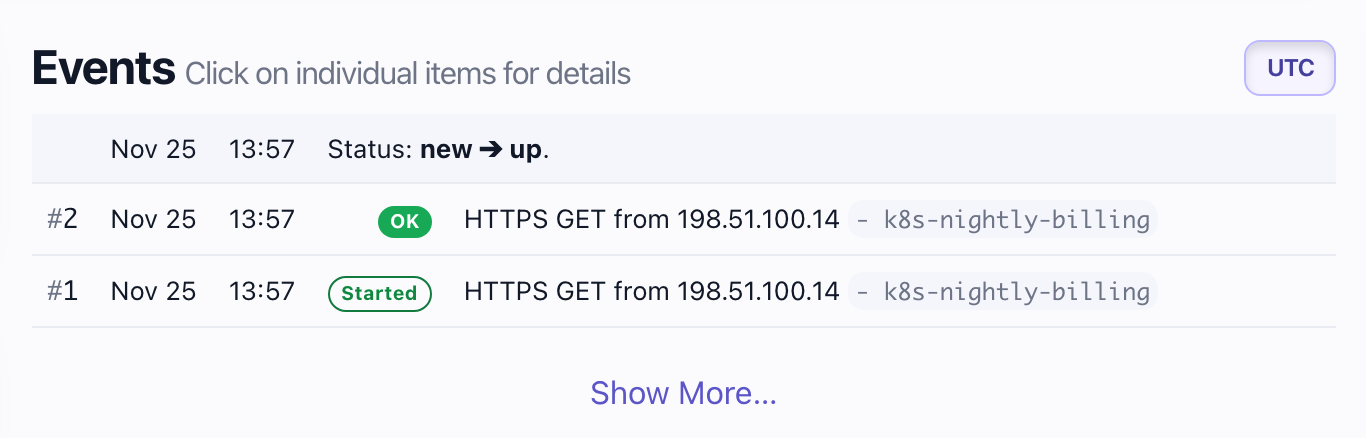
Once staging succeeds, deploy to production and let the first real scheduled run arm the production check. Open the check's Events view in Watchgoose, confirm Started and OK (k8s-nightly-billing) appear, and verify the check moved from New to Up. Delete the manual staging Job once verified (kubectl -n billing-staging delete job nightly-billing-manual-1).
Frequently asked questions
What does a Kubernetes CronJob TooManyMissedTimes warning mean?
When the CronJob controller calculates more than 100 missed start times during catch-up (for example after a control-plane outage or clock jump), current Kubernetes versions record a TooManyMissedTimes warning event and skip the older historical runs, while still scheduling the most recent run and continuing future schedules. Setting startingDeadlineSeconds bounds how far back the controller counts, and an external Watchgoose check alerts you on the first missed run.
What happens if a Kubernetes CronJob pod is OOMKilled before it can ping Watchgoose?
When the Linux kernel sends SIGKILL (exitCode: 137) because a container exceeded its memory limit, the process cannot run an exit handler or send a /fail ping. Because Watchgoose received /start (or expects a scheduled completion), it alerts you as soon as the grace period expires without a success ping.
Does Watchgoose need cluster RBAC permissions or an in-cluster agent?
No. Monitoring works strictly via outbound HTTPS requests from your job container to Watchgoose's ping endpoint. You do not install a cluster agent, expose the Kubernetes API, or grant any ServiceAccount RBAC permissions.
Can I monitor Kubernetes CronJobs that use spec.timeZone with daylight saving time?
Yes. Kubernetes 1.27 and newer support IANA time zones in spec.timeZone (for example Europe/Berlin or America/New_York). Select the exact same IANA time zone in your Watchgoose check so both schedules shift together on daylight saving transitions.
Why didn't Watchgoose alert when my CronJob failed for the first time?
A newly created Watchgoose check stays in the New state until it receives its first ping. Sending an explicit /fail (or non-zero exit code) or a /start ping that times out will alert immediately, but missed-schedule alerts only arm after the check receives its first successful ping. Always run one real test job to move the check from New to Up.