
Monitor ECS Cron Jobs on AWS Fargate: Failed and Missed Runs
Amazon ECS doesn't send alerts when a scheduled Fargate task crashes or quietly skips a run. Inside AWS, you can catch crashes by routing ECS Task State Change events through Amazon EventBridge to an SNS topic. That handles containers that start and exit with an error, or tasks that fail to launch. What it cannot catch is a run that never started at all, because if EventBridge Scheduler never creates a task, ECS has no stopped event to emit.
Picture a Fargate task that exports yesterday's transactions to S3 every night at 02:00 UTC, with Finance expecting the file by 02:30. Even when RunTask returns a task ARN, the image pull can fail, the container can run out of memory, or the script can stall before finishing the upload. To catch both crashes and silent skipped runs, have the worker send a quick HTTPS ping to Watchgoose right after the S3 upload commits. Once the first success arrives, Watchgoose expects the next one on schedule and alerts you if it is overdue. Because the task pushes outbound pings, you never have to grant Watchgoose an IAM role in your AWS account.
Get EventBridge and SNS alerts for failed ECS tasks
If you only need AWS-native crash alerts for a single-container task, create an event rule on the default EventBridge bus in the task's Region. This pattern matches stopped tasks from one task-definition family when a container exits with a non-zero code or when ECS fails to start the task at all:
{
  "source": ["aws.ecs"],
  "detail-type": ["ECS Task State Change"],
  "detail": {
    "lastStatus": ["STOPPED"],
    "taskDefinitionArn": [{"prefix": "arn:aws:ecs:us-east-1:123456789012:task-definition/nightly-export:"}],
    "$or": [
      {"containers": {"exitCode": [{"anything-but": 0}]}},
      {"stopCode": ["TaskFailedToStart"]}
    ]
  }
}
Replace the example ARN with your task-definition family prefix (keep the trailing colon so nightly-export: does not match nightly-export-v2:). Add "clusterArn" inside detail if other clusters run the same family, and keep in mind that manual runs of the family will match too. A healthy one-shot task also transitions to STOPPED, so filtering on STOPPED alone would page you on every successful run.
Point the rule at an SNS topic, allow EventBridge to publish to it, and confirm your email subscription. By default, SNS emails the raw JSON event, which is noisy to scan on a phone. Under the target's Additional settings, add an EventBridge input transformer to send a short summary instead:
{
  "cluster": "$.detail.clusterArn",
  "taskDef": "$.detail.taskDefinitionArn",
  "stopCode": "$.detail.stopCode",
  "reason": "$.detail.stoppedReason"
}
"ECS task stopped: <taskDef> in <cluster>. Code: <stopCode>. Reason: <reason>"
If your task definition includes sidecar containers (such as a log router or metrics collector), the containers.exitCode branch above will also fire when a sidecar exits non-zero. To alert only when the worker fails or the task fails to start, target a small Lambda function instead of SNS directly. Allow the EventBridge rule to invoke the function, grant the Lambda execution role sns:Publish on your destination topic ARN, and use this filter condition inside your handler to publish only when worker_failed is true:
worker_failed = (
    event["detail"].get("stopCode") == "TaskFailedToStart"
    or any(
        c.get("name") == "export"
        and type(c.get("exitCode")) is int
        and c["exitCode"] != 0
        for c in event["detail"].get("containers", [])
    )
)
Why AWS-native rules still miss skipped runs
EventBridge rules only react to events that happen. If a bad Terraform apply disables the schedule, breaks iam:PassRole, or shifts the run to a different hour, there may be no task at the expected time and no stopped event for the rule to match. EventBridge Scheduler's dead-letter queue (DLQ) catches failed target deliveries from Scheduler to ECS, not an export that starts cleanly and crashes ten minutes later or stalls halfway through an S3 upload.
Scroll horizontally to see all columns.
| Failure mode | EventBridge rule | Scheduler DLQ | Watchgoose heartbeat |
|---|---|---|---|
| Container exits with non-zero code | Yes | No | Failure if the worker sends its exit code; missed deadline if it dies before pinging. |
| Task fails to start (image, secret, ENI) | Yes (with TaskFailedToStart) | No | Yes (missed deadline) |
RunTask IAM or throttling error | No | Yes, if delivery ultimately fails and the DLQ is configured. | Yes (missed deadline) |
| Schedule disabled, deleted, or shifted | No | No | Yes (missed deadline) |
| Task hangs past its deadline | No (still running) | No | Yes (missed deadline or /start grace) |
Missed-deadline alerts in Watchgoose start after the check receives its first success ping; explicit failures and /start timeouts can alert before that.
You can build missed-run detection inside AWS by publishing a custom CloudWatch metric from the worker and alarming on missing data (TreatMissingData: breaching), with an evaluation window that matches the expected completion. A Step Functions workflow can also wait for a task it launched; to detect a workflow that never started, monitor its expected completion separately.
A heartbeat check takes a simpler route: give Watchgoose the same schedule and time zone as EventBridge Scheduler, have the task ping when its work finishes, and get an alert when a run fails or goes overdue.
Step 1: Match the EventBridge schedule
Create a free Watchgoose account (includes up to 10 checks, no credit card required), then create a check named production / nightly-export. Keep a separate check for staging so test runs don't mask production misses.
Scroll horizontally to see all columns.
| Setting | EventBridge Scheduler | Watchgoose |
|---|---|---|
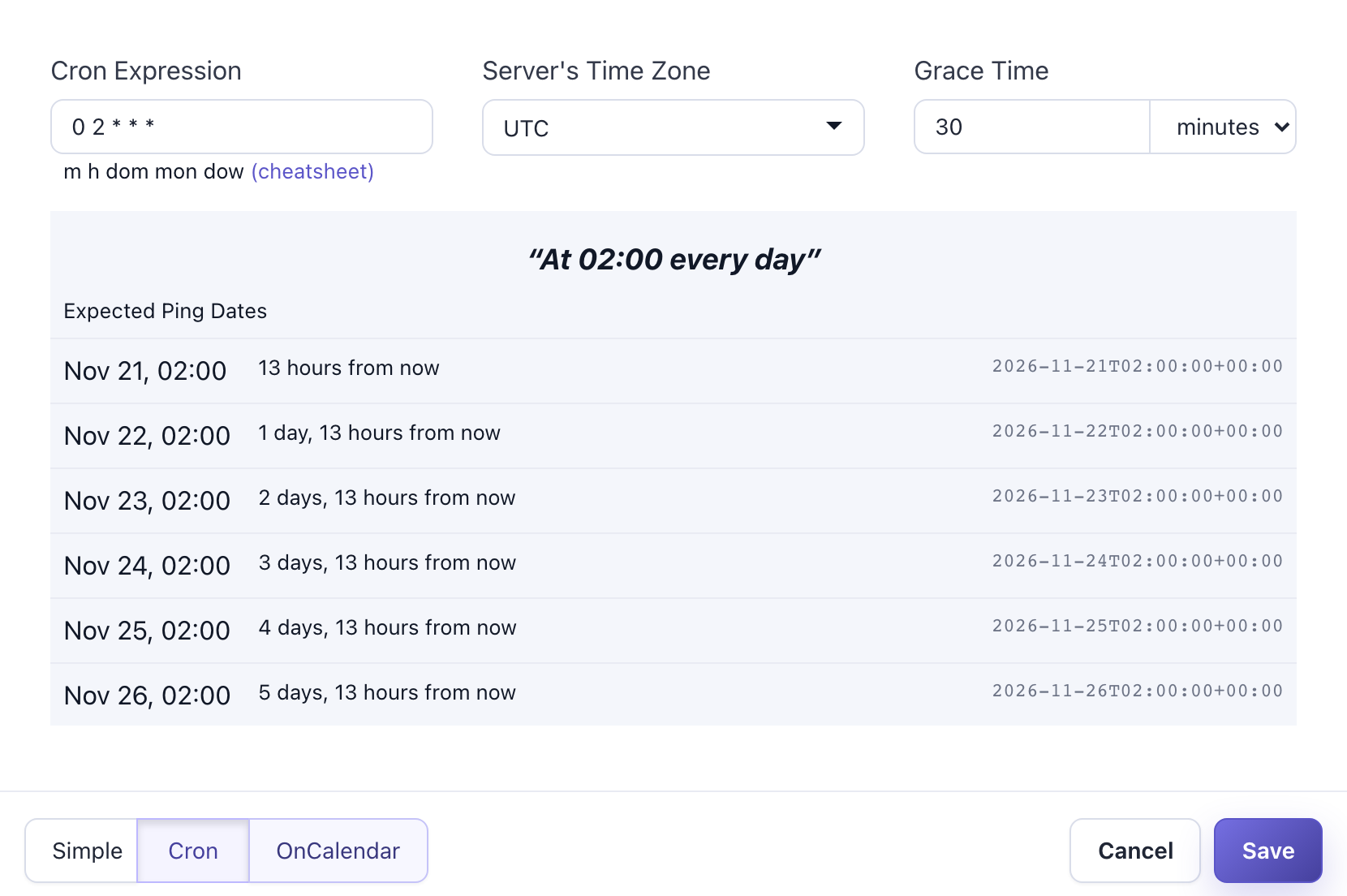
| Nightly at 02:00 | cron(0 2 * * ? *) | 0 2 * * * |
| Time zone | UTC | UTC |
| Deadline | Flexible time window off | 30-minute grace: success due by 02:30 |
Watchgoose uses standard five-field cron syntax instead of EventBridge's six-field expression. Leave enough grace time for Fargate cold start, image pull, the export itself, and the final ping. EventBridge Scheduler triggers at minute precision, and by default it retries failed target deliveries up to 185 times over 24 hours unless you tighten retry_policy. If you enable a flexible time window, leave retries open, or schedule in a local time zone, make sure the latest acceptable finish still fits inside your grace window.
Connect a notification channel such as Slack, Microsoft Teams, PagerDuty, email, or a webhook, and confirm it is enabled for this check.
Optional: Configure the schedule in Terraform
If this schedule replaces a cron job running elsewhere, create it with state = "DISABLED" and switch it on in Step 4. If Terraform already manages your ECS schedule, don't add a second trigger or disable it: add only the retry_policy block to your existing resource.
This aws_scheduler_schedule block assumes an existing ECS cluster, task definition, Scheduler IAM role, and private subnets with outbound internet egress. Capping retry_policy to 10 minutes overrides Scheduler's 24-hour default so a failed 02:00 launch won't fire during business hours:
resource "aws_scheduler_schedule" "nightly_export" {
  name                         = "nightly-export"
  state                        = "DISABLED"
  schedule_expression          = "cron(0 2 * * ? *)"
  schedule_expression_timezone = "UTC"

  flexible_time_window {
    mode = "OFF"
  }

  target {
    arn      = var.cluster_arn
    role_arn = var.scheduler_role_arn

    retry_policy {
      maximum_event_age_in_seconds = 600
      maximum_retry_attempts       = 3
    }

    ecs_parameters {
      task_definition_arn = var.export_task_definition_arn
      launch_type         = "FARGATE"
      task_count          = 1

      network_configuration {
        subnets          = var.private_subnet_ids
        security_groups  = [var.export_security_group_id]
        assign_public_ip = false
      }
    }
  }
}
Step 2: Inject the private ping URL
Store the check's full HTTPS ping URL as a plain string in AWS Secrets Manager (or as a SecureString in AWS Systems Manager Parameter Store if you want to avoid Secrets Manager's per-secret monthly fee). Treat it like a password: anyone with the URL can report results for the check.
Reference the secret ARN in the worker container definition, not in Scheduler's target input:
{
  "secrets": [{
    "name": "WATCHGOOSE_https://watchgoose.com/ping/your-uuid-here",
    "valueFrom": "arn:aws:secretsmanager:us-east-1:123456789012:secret:watchgoose/nightly-export-AbCdEf"
  }]
}
ECS splits permissions across three IAM roles, and mixing them up is one of the most common reasons scheduled tasks fail to launch:
Scroll horizontally to see all columns.
| Role | Permissions needed |
|---|---|
| Scheduler execution role | Trust scheduler.amazonaws.com; allow ecs:RunTask on the task definition ARN and iam:PassRole on both the task execution role and application task role. |
| ECS task execution role | secretsmanager:GetSecretValue for the secret ARN (or ssm:GetParameters for Parameter Store), plus kms:Decrypt if using a customer-managed KMS key, alongside standard ECR image-pull and CloudWatch Logs permissions. |
| Application task role | Only the job's own permissions, such as s3:PutObject. It does not need secret-read access because ECS resolves the secret through the task execution role before the container starts. |
Register the new task-definition revision and point your schedule at it. The worker also needs outbound DNS and HTTPS access to the ping host (for example via a NAT Gateway in private subnets, or a public subnet with assign_public_ip = true); a Secrets Manager VPC endpoint alone does not give the container internet egress. Never log WATCHGOOSE_https://watchgoose.com/ping/your-uuid-here or dump the full container environment on startup.
Step 3: Report completion from Python
Call ping from the process that actually knows the S3 upload succeeded, not from a wrapper that only enqueues a background job. Save the module below as monitored_export.py, replace the import with your synchronous export function, and run it with python -m monitored_export. Your export function can return None on success, return an exit code from 0 to 255, call sys.exit(...), or raise an exception:
import http.client
import os
import sys
import time
from contextlib import closing
from urllib.parse import urlsplit

from myapp.exports import export_previous_day


def main():
    ping("start")
    try:
        rc = export_previous_day()
        if rc is None:
            rc = 0
        elif type(rc) is not int or not 0 <= rc <= 255:
            raise ValueError("expected None or an exit status from 0 to 255")
    except SystemExit as exc:
        if exc.code is None:
            ping("0")
        elif type(exc.code) is int and 0 <= exc.code <= 255:
            ping(str(exc.code))
        else:
            ping("fail")
        raise
    except Exception:
        ping("fail")
        raise
    ping(str(rc))
    return rc


def ping(event, body=b""):
    try:
        u = urlsplit(os.environ.get("WATCHGOOSE_https://watchgoose.com/ping/your-uuid-here", ""))
        host, port = u.hostname, u.port
    except ValueError:
        print("Watchgoose ping skipped: invalid WATCHGOOSE_https://watchgoose.com/ping/your-uuid-here", file=sys.stderr)
        return
    if (
        u.scheme != "https"
        or not host
        or not u.path.strip("/")
        or u.username is not None
        or u.password is not None
        or u.query
        or u.fragment
    ):
        print("Watchgoose ping skipped: invalid WATCHGOOSE_https://watchgoose.com/ping/your-uuid-here", file=sys.stderr)
        return

    path = u.path.rstrip("/") + "/" + event
    headers = {"User-Agent": "ecs-nightly-export"}
    for attempt in range(3):
        try:
            with closing(http.client.HTTPSConnection(host, port, timeout=5)) as conn:
                conn.request("POST", path, body=body, headers=headers)
                if conn.getresponse().status == 200:
                    return
        except (OSError, ValueError, http.client.HTTPException):
            pass
        if attempt < 2:
            time.sleep(attempt + 1)

    print("Watchgoose ping not confirmed", file=sys.stderr)


if __name__ == "__main__":
    sys.exit(main())
Watchgoose treats /0 as success and /1 through /255 (as well as /fail) as an immediate failure. Notice that a failed ping logs a warning to stderr and returns without masking the export's own exit code, and ping() makes up to three attempts. If none reaches Watchgoose, the export can still finish without its success being recorded.
If you want failure alerts to include a short error summary instead of sending you straight to CloudWatch Logs, you can pass sanitized text in body on ping("fail", ...) (see attaching logs). Redact secrets and customer data before sending, and cap the encoded summary (for example, at 1 KiB). Never send a success ping from a finally block.
The /start ping is optional: it lets Watchgoose measure run duration and start a runtime deadline right away, even before the check's first success. It uses the same grace setting and never extends the scheduled deadline.
Shell alternative: Report the command's exit status
For a non-Python job or shell entrypoint, use this POSIX sh wrapper instead. Make sure your container image includes curl and ca-certificates (many slim and Alpine images leave them out, and distroless images have no /bin/sh).
Supply the standard HTTPS check URL in WATCHGOOSE_https://watchgoose.com/ping/your-uuid-here and replace /app/bin/export with your foreground command. Passing the URL through curl's --config - stdin keeps it off the process command line and works on older curl releases too. Keep set -x shell tracing off so secrets never land in CloudWatch Logs:
#!/bin/sh
ping() {
    url=${WATCHGOOSE_https://watchgoose.com/ping/your-uuid-here:-}
    case "$url" in
        *[!a-zA-Z0-9:/._%-]*|'') ;;
        https://?*/*?*)
            if code=$(curl --disable --silent --globoff --proto '=https' \
                --connect-timeout 3 --max-time 10 --retry 3 --retry-max-time 20 \
                --output /dev/null --write-out '%{http_code}' \
                --request POST --config - 2>/dev/null <<EOF
url = "${url%/}/$1"
EOF
            ) && [ "$code" = 200 ]; then return 0; fi ;;
    esac
    printf '%s\n' 'Watchgoose ping not confirmed; check curl, URL and HTTPS egress' >&2
}

ping start
rc=0
/app/bin/export || rc=$?
ping "$rc"
exit "$rc"
If your worker needs SIGTERM for graceful shutdown, avoid inserting a shell wrapper as PID 1 in front of it; send the pings directly from the application process instead, as in the Python example above. If you also run scheduled containers outside ECS, see our Docker cron jobs guide.
Step 4: Test the task and confirm the first run
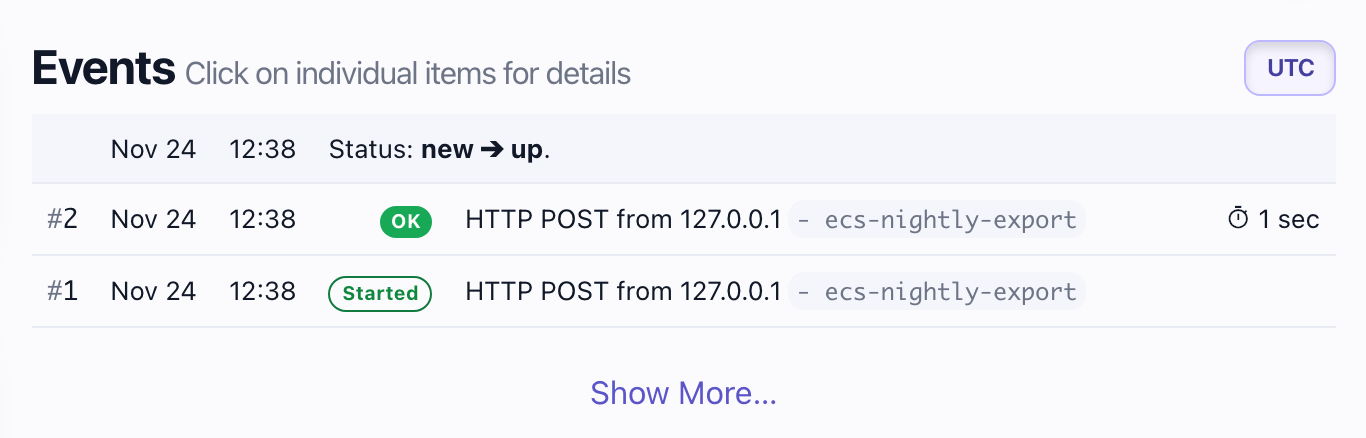
Confirm the first success in Watchgoose before relying on missed-run alerts. Recurring missed-success alerts begin with the first success. If no ping gets through, the check stays New; an explicit failure or an expired runtime deadline can take it Down even before a success.
- Run the updated task revision once in staging. Confirm the exported file landed in S3 with the expected date, then open Events on the staging check and verify you see
OKand the status change fromnewtoup. - Enable the staging schedule and let it trigger one run. Keep the replacement production schedule disabled until cutover. A manual
RunTasktests the container and ping, not EventBridge Scheduler's trigger or IAM role. - At cutover, hand each export period to one scheduler only. Disable the old cron job before enabling the ECS schedule so both don't write to the same S3 destination.
- Watch the first scheduled production run land on the production check. If you shard an export across parallel tasks, have only the coordinator that verifies every shard send the overall success ping.
Why didn't my ECS scheduled task run?
When a missed-run or failure alert wakes you up, trace the failure from the scheduler down to the output file.
Scheduler never created the task
If no task appears in ECS history, check the AWS Region, whether the schedule is ENABLED, the time zone, the target task-definition revision, the cluster ARN, and the Scheduler role's ecs:RunTask and iam:PassRole permissions.
In CloudWatch under AWS/Scheduler, inspect InvocationAttemptCount, TargetErrorCount, and InvocationDroppedCount. If you configured a DLQ and it looks empty, check both InvocationsSentToDeadLetterCount and InvocationsFailedToBeSentToDeadLetterCount (a missing SQS/KMS permission can block DLQ delivery itself). Keep in mind that schedule-group metrics aggregate across schedules and don't prove this specific job ran.
ECS stopped the task before the app started
When ECS creates a task that never reaches RUNNING, check its stopCode, stoppedReason, and the container's reason in the ECS console or DescribeTasks. TaskFailedToStart typically points to CannotPullContainerError (bad image tag, missing ECR permissions, or no outbound route to the registry) or ResourceInitializationError (the task execution role cannot read the Secrets Manager secret or KMS key, or ENI/subnet provisioning failed). If the worker never launched, it may have no application logs.
The container exited with a non-zero code
Check the worker container's exitCode and its CloudWatch log stream (assuming awslogs is configured). Exit code 137 usually means the container hit its memory limit and was killed by SIGKILL, or ignored SIGTERM until ECS forced it down. In multi-container tasks, double-check which container exited: a sidecar's exit code is not the export's result.
Watchgoose saw Started, then timed out
A /start ping with no completion means the task is still running past the grace window, was killed mid-run (for example by an out-of-memory kill or a Fargate Spot interruption), or finished the export but couldn't deliver the final ping. Check ECS task timestamps and the S3 object before rerunning a non-idempotent write.
The check is Up, but the S3 file is stale
Check the date inside the file (or its S3 key) rather than relying on the upload timestamp, and verify which environment sent the last ping. Send the success ping only after multipart upload completion and any freshness checks pass. Watchgoose confirms that your task reported completion on time; it does not inspect S3 buckets or verify that backups are restorable.
Frequently asked questions
Does Amazon ECS alert me when a scheduled task fails?
Not by default. To get native crash alerts, create an EventBridge rule that matches stopped ECS Task State Change events with a non-zero container exit code or TaskFailedToStart and routes them to an SNS topic. Because ECS emits no event when a schedule never triggers a task, add a heartbeat check if you also need missed-run alerts.
Should I use EventBridge Scheduler or a scheduled rule?
AWS recommends EventBridge Scheduler for new schedules. Scheduler supports named time zones, flexible time windows, configurable retry policies, and dead-letter queues, whereas legacy scheduled EventBridge rules run in UTC only. Keep using a standard EventBridge event rule for routing ECS task state changes to SNS or Lambda; that is separate from the schedule itself.
How do I get Slack or Microsoft Teams alerts for failed ECS scheduled tasks?
In AWS, format the EventBridge message as an Amazon Q Developer custom notification and publish it to the SNS topic configured for your Slack or Teams channel. A plain-text SNS email template won't render as a chat notification in Slack or Teams. If you want both crash alerts and missed-run alerts without maintaining custom notification templates or Lambda glue, connect a Watchgoose check to Slack, Microsoft Teams, PagerDuty, or a webhook and have the task report its exit status.
Why didn't EventBridge Scheduler's dead-letter queue catch my failed task?
EventBridge Scheduler's dead-letter queue only captures failures to invoke the ECS RunTask API, such as IAM permission errors or throttling. Once ECS accepts RunTask and creates a task, Scheduler considers the delivery successful. Any image-pull error, out-of-memory kill, or non-zero application exit code happens afterwards and never goes to the Scheduler DLQ.
Does a missed-run alert always mean the ECS task failed?
Not necessarily. A missed-run alert means Watchgoose did not receive a success ping by the scheduled time plus grace period. The task might have never started, crashed before pinging, stalled past the deadline, or finished the work while a network issue blocked its outbound ping.
Sources
- AWS: Schedule ECS tasks with EventBridge Scheduler, legacy scheduled rules, and
RunTaskAPI. - AWS: ECS stopped-task alerts to SNS, ECS task state change events, EventBridge
$orandanything-butoperators, EventBridge input transformation, and custom notifications for Slack and Teams. - AWS: EventBridge Scheduler CloudWatch metrics, Scheduler retries and DLQs, Secrets Manager injection, task execution role, stopped-task errors, and
awslogsdriver. - Terraform:
aws_scheduler_scheduleresource. - Watchgoose: Slack alerts for cron jobs, Microsoft Teams alerts for cron jobs, Docker cron jobs, and Kubernetes CronJob monitoring.