
Laravel Scheduler Monitoring: Catch Missed and Failed Cron Jobs
Laravel's task scheduler runs everything through a single system cron entry (php artisan schedule:run every minute). That keeps crontab clean, but it also creates a single point of failure. If cron stops, a deploy drops the crontab line, a Redis lock hangs onOneServer(), or a worker runs out of memory mid-command, Laravel has no process left to report the problem. You only find out when someone notices yesterday's invoices or reports never went out.
Laravel already ships with built-in HTTP ping hooks (pingBefore, pingOnSuccess, and pingOnFailure). Pair those hooks with an external schedule check in Watchgoose and you cover both halves of the problem: an explicit failure alert when an Artisan command throws an exception, and an overdue alert when a scheduled task never finishes before its deadline.
How Laravel's task scheduler actually fails silently
Every minute, cron runs php artisan schedule:run. Laravel boots the framework, evaluates the schedule expressions in routes/console.php (Laravel 11 and 12) or app/Console/Kernel.php (Laravel 10), and launches whatever commands are due for that minute.
A task can fail without sending a single error to your team in five common ways:
- The single cron line disappeared. A fresh server image, Forge/Envoyer provisioning hiccup, or container restart dropped
* * * * * php /var/www/artisan schedule:run. No exception is logged because PHP never booted. - A server crash or in-process OOM kill stopped PHP before hooks ran.
Schedule::command()runs Artisan in a child process, so if only the child is OOM-killed (exit 137), the parentschedule:runprocess survives and can still firepingOnFailure. If the entire server or container dies, or an in-processSchedule::call()closure gets killed by OOM before returning, no failure hook ever executes. withoutOverlapping()left a stale lock behind. By default, Laravel holds an overlap mutex for 24 hours. If a server reboots while a command is running, every subsequent run for the next day is quietly skipped unless you lower the expiry or clear the cache lock.onOneServer()lost its cache driver or clock sync. Multi-server scheduling depends on a shared atomic cache (Redis, Memcached, DynamoDB, or database). If the cache falls back tofileorarrayon a misconfigured node, tasks either skip or run twice.- A foreground command blocked later tasks. Tasks scheduled for the same minute run sequentially by default unless you add
runInBackground(). A slow command at02:00can delay or starve other02:00jobs.
Native Laravel hooks vs external heartbeat monitoring
Laravel's emailOutputOnFailure() and onFailure() hooks work well when PHP stays alive and the command returns a non-zero exit code. They cannot tell you when schedule:run never fired at all.
Scroll horizontally to see all columns.
| Failure mode | emailOutputOnFailure() | Laravel error tracker (Sentry/Bugsnag) | Watchgoose heartbeat + Laravel hooks |
|---|---|---|---|
| Artisan command throws exception or exits non-zero | Yes (if mail works) | Yes | Yes (pingOnFailure sends immediate /fail) |
| Container/host OOM kill or in-process closure crash | No | Usually no | Yes (overdue alert after grace ends) |
| System cron stopped or crontab wiped | No | No | Yes (overdue alert after grace ends) |
Skipped due to stale withoutOverlapping lock | No | No | Yes (overdue alert after grace ends) |
| Command hangs past expected runtime | No (still running) | No | Yes (/start deadline or missed schedule + grace) |
Missed-run alerts in Watchgoose start after the check receives its first successful ping. Explicit failure pings (/fail) and /start runtime timeouts can alert even before the first success.
Step 1: Create a check matching your Laravel schedule
Create a free Watchgoose account (includes up to 10 checks, no credit card required), then create a check for each critical scheduled task. For example, for a nightly billing command that runs at 02:00 UTC, name the check production / laravel-billing-sync and match its schedule:
Scroll horizontally to see all columns.
| Setting | Laravel schedule | Watchgoose check |
|---|---|---|
| Schedule | dailyAt('02:00') | Cron: 0 2 * * * |
| Time zone | timezone('UTC') (or config/app.php) | UTC (match Laravel exactly) |
| Grace time | Typical run takes 4 minutes | 20 minutes (overdue at 02:20 UTC) |
Use Watchgoose's five-field cron syntax and match the time zone Laravel evaluates the task in. If your app sets 'timezone' => 'Europe/London' in config/app.php or chains ->timezone('America/New_York') on the task, select that exact IANA time zone in Watchgoose so daylight saving shifts stay aligned.
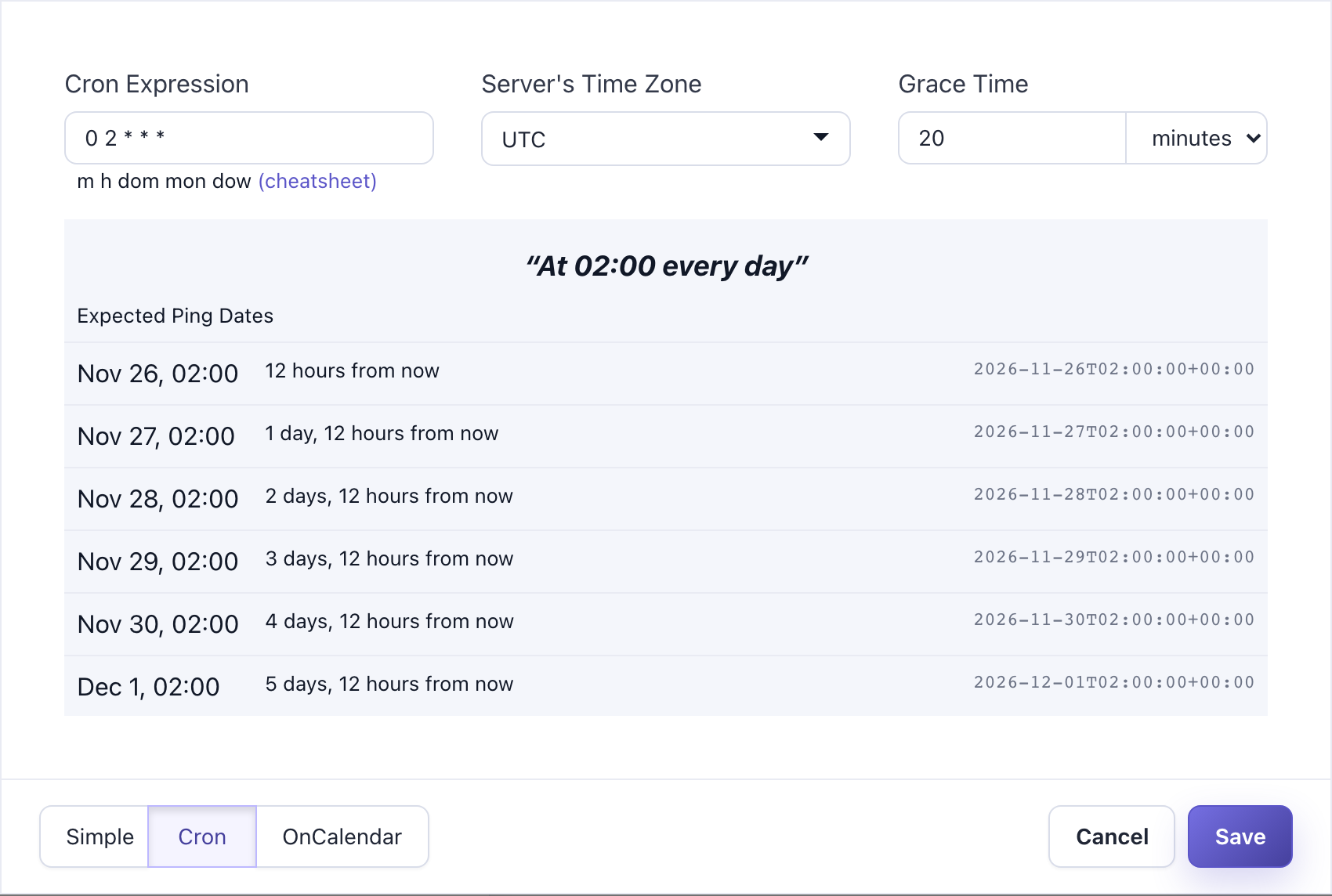
Connect a notification channel such as Slack, Microsoft Teams, Discord, PagerDuty, or email, and confirm it is turned on for the check. Keep staging and production on separate checks (or skip pinging in non-production environments) so test runs never hide a missed production job.
Step 2: Store the ping URL in config, not raw env calls
Copy the check's ping URL (for example https://watchgoose.com/ping/<uuid>) and store it in your production environment file:
WATCHGOOSE_BILLING_https://watchgoose.com/ping/your-uuid-here=https://watchgoose.com/ping/00000000-0000-0000-0000-000000000000
WATCHGOOSE_SCHEDULER_https://watchgoose.com/ping/your-uuid-here=https://watchgoose.com/ping/11111111-1111-1111-1111-111111111111
In production Laravel deployments, php artisan config:cache caches configuration files and causes direct env() calls outside config/*.php to return null. Expose the ping URLs through config/services.php instead:
// config/services.php
return [
    // ... other services

    'watchgoose' => [
        'billing_ping_url' => env('WATCHGOOSE_BILLING_https://watchgoose.com/ping/your-uuid-here'),
        'scheduler_ping_url' => env('WATCHGOOSE_SCHEDULER_https://watchgoose.com/ping/your-uuid-here'),
    ],
];
Never commit real ping URLs to Git. Anyone who has a check's ping URL can send fake success or failure signals to that check.
Step 3: Attach pingBefore, pingOnSuccess, and pingOnFailure
In Laravel 11 and 12, scheduled tasks live in routes/console.php. (In Laravel 10 and earlier, put the same calls inside schedule(Schedule $schedule) in app/Console/Kernel.php.)
Guard the ping hooks with a simple non-empty check on the configured URL so local development and CI environments without a production ping URL never emit failed HTTP calls (do not use Laravel's ->when() on the task itself, because ->when() skips running the entire command, not just the ping hooks):
<?php

use Illuminate\Support\Facades\Schedule;

$billingPingUrl = rtrim((string) config('services.watchgoose.billing_ping_url'), '/');

$billingTask = Schedule::command('billing:sync-invoices')
    ->dailyAt('02:00')
    ->timezone('UTC')
    ->withoutOverlapping(30)
    ->onOneServer()
    ->runInBackground();

if ($billingPingUrl !== '') {
    $billingTask
        ->pingBefore($billingPingUrl . '/start')
        ->pingOnSuccess($billingPingUrl)
        ->pingOnFailure($billingPingUrl . '/fail');
}
Here is what each hook tells Watchgoose:
pingBefore($url . '/start')records the start time so Watchgoose tracks job duration and raises an alert if the command hangs longer than your grace window.pingOnSuccess($url)sends a success ping only when the Artisan command exits with code0(Command::SUCCESS).pingOnFailure($url . '/fail')immediately marks the check Down when the command exits non-zero or throws an unhandled exception, instead of waiting for the grace period to expire.
Avoid using thenPing() on its own for critical jobs. thenPing() runs unconditionally after a task finishes, even when the command failed with a non-zero exit code, which would falsely report a crashed job as Up. Use pingOnSuccess() paired with pingOnFailure() instead.
Sending short failure details from an Artisan command
Laravel's built-in pingOnFailure() sends an empty HTTP GET request. If you want the failure alert in Slack or email to include the failing exception class and a short sanitized message, call Watchgoose with Laravel's HTTP client inside onFailure() instead of pingOnFailure(), keeping timeouts short so alerting never stalls the scheduler:
use Illuminate\Support\Facades\Http;
use Illuminate\Support\Facades\Log;
use Illuminate\Support\Facades\Schedule;

$billingPingUrl = rtrim((string) config('services.watchgoose.billing_ping_url'), '/');

$billingTask = Schedule::command('billing:sync-invoices')
    ->dailyAt('02:00')
    ->timezone('UTC')
    ->withoutOverlapping(30)
    ->onOneServer();

if ($billingPingUrl !== '') {
    $billingTask
        ->pingBefore($billingPingUrl . '/start')
        ->pingOnSuccess($billingPingUrl)
        ->onFailure(function () use ($billingPingUrl): void {
            try {
                Http::timeout(5)
                    ->retry(2, 200, throw: false)
                    ->withHeaders(['User-Agent' => 'laravel-scheduler'])
                    ->withBody('billing:sync-invoices exited non-zero on ' . gethostname(), 'text/plain')
                    ->post($billingPingUrl . '/fail');
            } catch (\Throwable $e) {
                Log::warning('Watchgoose failure ping failed', ['error' => $e->getMessage()]);
            }
        });
}
Keep any attached log body free of customer PII, API keys, or SQL query literals.
Step 4: Monitor the scheduler loop itself
Monitoring a nightly command tells you by 02:20 UTC if that task failed, which means a broken crontab at 09:00 UTC could stay invisible for 17 hours. Add one lightweight heartbeat check for the Laravel scheduler loop itself:
$schedulerPingUrl = rtrim((string) config('services.watchgoose.scheduler_ping_url'), '/');

if ($schedulerPingUrl !== '') {
    Schedule::call(static fn (): bool => true)
        ->name('watchgoose-scheduler-heartbeat')
        ->everyFiveMinutes()
        ->onOneServer()
        ->pingOnSuccess($schedulerPingUrl);
}
In Watchgoose, configure that check with a simple period of 5 minutes (or cron */5 * * * *) and a 5 minute grace period. If schedule:run stops firing on your app server or container, you get alerted within ten minutes rather than discovering the outage the next morning.
Notice ->name('watchgoose-scheduler-heartbeat') is required whenever you combine Schedule::call() (a closure) with onOneServer() or withoutOverlapping(), because Laravel derives the mutex key from the task name.
Avoid silent skips from withoutOverlapping and onOneServer
Two common Laravel scheduler modifiers cause silent missed runs if misconfigured:
- Default
withoutOverlapping()expires after 1,440 minutes (24 hours). If a worker crashes or a container is replaced mid-run, the mutex stays in cache for a full day and skips every scheduled run in between. Always pass an explicit minute ceiling just above your longest expected run, such aswithoutOverlapping(30). onOneServer()requires a shared cache store. ConfirmCACHE_STORE(Laravel 11/12) orCACHE_DRIVER(Laravel 10) points to Redis, Memcached, DynamoDB, or a shared database table across all scheduler hosts, or callSchedule::useCache('redis');at the scheduler level inroutes/console.php.- Maintenance mode skips tasks by default. When you run
php artisan downduring a deployment, scheduled tasks do not run unless you chain->evenInMaintenanceMode(). If a long maintenance window overlaps a nightly job, Watchgoose will rightly alert unless you pause the check or allow the task during maintenance.
Step 5: Test locally and confirm the first run
Verify your schedule definitions and ping URL wiring before waiting for 02:00 UTC:
php artisan config:clear
php artisan config:cache
php artisan schedule:list
Confirm your task appears with the expected cron expression and next due time. To verify your ping wiring without executing a live production billing job out of schedule, run schedule:test in staging or against the harmless heartbeat task first:
php artisan schedule:test --name=watchgoose-scheduler-heartbeat
If you are in staging (or your command is safe to run out of band), you can test the billing task the same way (php artisan schedule:test --name=billing:sync-invoices). Open the check's Events view in Watchgoose: the simple watchgoose-scheduler-heartbeat task (which calls only pingOnSuccess) records an OK ping, while a task wired with both pingBefore and pingOnSuccess records Started followed by OK with the measured runtime (sent with Guzzle's HTTP user agent). Either transitions the check from New to Up, arming missed-run monitoring.
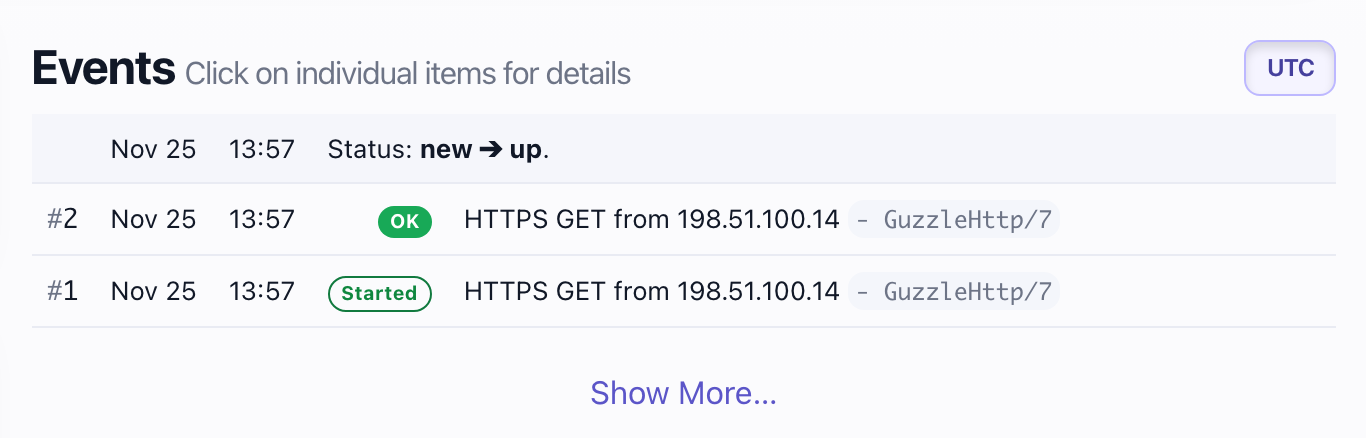
Also confirm the OS cron entry itself is installed as the same user that owns your Laravel app (often www-data or forge):
* * * * * cd /var/www/current && /usr/bin/php artisan schedule:run >> /dev/null 2>&1
If you run Laravel in Docker or Kubernetes instead of a traditional VM, run php artisan schedule:work in a dedicated scheduler container, or follow the Docker cron jobs guide for container signal handling.
Why isn't my Laravel scheduler running?
When a Watchgoose alert fires for a missed Laravel task, walk through these checks in order:
- Check whether cron is invoking
schedule:run. On Linux, rungrep -i schedule:run /var/log/syslog(Debian/Ubuntu) orjournalctl -u cron --since "1 hour ago". If there are no entries, checkcrontab -l -u www-dataand confirm the cron service is running. - Verify PHP binary path and version. Interactive shells often resolve a newer PHP in
/usr/local/bin/php, while cron's minimalPATHhits an older/usr/bin/php. Runwhich phpand put the full path in the crontab. - Check
php artisan schedule:liston the production host. If a task shows a different next run time than expected, inspectconfig/app.php'stimezoneand check whetherphp artisan config:cacheis serving stale values from a previous release. - Inspect stale mutex locks. If
schedule:runoutputsNo scheduled commands are ready to runwhen a job was due, check whetherwithoutOverlapping()left a lock key in Redis (redis-cli --scan --pattern '*framework/schedule-*'). - Check background command failures. Tasks using
runInBackground()write errors tostorage/logs/laravel.logor fail if thephpCLI binary cannot write tostorage/framework/cache. Run the Artisan command directly once as the cron user to see stderr immediately.
Frequently asked questions
Does Laravel's pingOnSuccess work with runInBackground()?
Yes. When you chain runInBackground(), Laravel executes the command in a subshell that runs php artisan schedule:finish upon exit, which fires pingOnSuccess or pingOnFailure based on the exit code. Keep in mind that if the server loses power or the OOM killer terminates the subshell, schedule:finish never runs, which is why pairing the hooks with a scheduled Watchgoose check is still needed.
Why shouldn't I use thenPing() to monitor a Laravel job?
Laravel runs thenPing() after a scheduled task finishes regardless of whether the task succeeded or exited with an error. If you point thenPing() at a Watchgoose success URL, a crashing Artisan command will still send a success ping and hide the outage. Use pingOnSuccess() for the base URL and pingOnFailure() for /fail.
Why do my env() ping URLs return null in production?
Running php artisan config:cache compiles all files under config/ and stops Laravel from loading .env at runtime, so any env() call inside routes/console.php or app/Console/Kernel.php returns null. Define your ping URLs inside config/services.php and read them with config('services.watchgoose.billing_ping_url').
Should I monitor schedule:run every minute or monitor each Artisan command separately?
Do both. A single 5-minute heartbeat task catches a dead cron daemon or crashed scheduler container within minutes, while separate checks on critical business commands (billing, backups, data imports) catch individual command exceptions, OOM kills, and stale withoutOverlapping() locks.
What happens if a Watchgoose ping times out during schedule:run?
Laravel executes pingBefore, pingOnSuccess, and pingOnFailure via Guzzle with a 30-second request timeout and a 10-second connect timeout (defined in Illuminate\Console\Scheduling\Event), and catches connection errors so an unreachable monitoring endpoint does not abort your scheduled business task. If you write a custom onFailure() callback with Laravel's Http facade, wrap it in try/catch with a short timeout (such as 5 seconds) for the same fail-open behavior.