
Monitor GitHub Actions Scheduled Workflows: Silent Delays and Missed Runs
GitHub Actions on: schedule workflows are best-effort, not a hard cron daemon. During periods of high load (especially at the start of every hour, such as 0 * * * *), GitHub warns that scheduled runs can be delayed and, in worse cases, dropped altogether. On public repositories GitHub also disables scheduled workflows automatically after 60 days without repository activity, and forks disable them by default.
GitHub's built-in failure emails only fire when a workflow actually runs and fails. If GitHub skips the trigger, auto-disables the workflow, or someone pushes a syntax error that prevents the workflow from parsing, GitHub stays completely quiet. Adding a Watchgoose heartbeat check gives you both: an immediate failure signal when a step breaks or is cancelled, and an overdue alert when a scheduled run never arrives on time.
Why GitHub Actions scheduled workflows fail silently
Five quirks of GitHub Actions schedules catch teams off guard in production:
- Top-of-the-hour queue delays and dropped runs. GitHub warns that high load at the start of every hour (
0 * * * *) delays scheduled events and can cause runs to be dropped. Moving0 2 * * *to an off-peak minute like17 2 * * *reduces jitter noticeably. - 60-day inactivity auto-disable on public repositories. If nobody pushes a commit or interacts with a public repository for 60 days, GitHub disables its scheduled workflows without creating a failed run.
- Only the default branch runs
on: schedule. Editing a cron expression on a feature branch does nothing until it merges into the repository's default branch. - Schedules default to UTC unless
timezoneis set. GitHub Actions supports an optionaltimezonekey (any IANA time zone such asAmerica/New_YorkorEurope/London) under each schedule entry, and defaults to UTC when omitted. During daylight saving spring-forward transitions, a scheduled time that falls in a skipped local hour moves forward to the next valid time. Keep Watchgoose's time zone matched to the same IANA value. - Workflow YAML parse errors produce no failed job steps. A broken indentation or invalid expression in
.github/workflows/*.ymlfails before your Slack or webhook notification step ever executes.
GitHub native notifications vs heartbeat monitoring
Scroll horizontally to see all columns.
| Failure mode | GitHub email notifications | In-workflow Slack/Discord step | Watchgoose heartbeat |
|---|---|---|---|
| Workflow step exits non-zero | Sent to the user who last modified the cron syntax (easy to miss on shared repos) | Yes (if if: failure() runs) | Yes (immediate /fail ping) |
Workflow cancelled or hits timeout-minutes | Often missed or suppressed | Only with if: always() | Yes (/fail on cancel or /start grace timeout) |
| Scheduled run dropped by GitHub queue | No | No | Yes (overdue alert after grace ends) |
| Workflow auto-disabled after 60 days | No failed run email | No | Yes (overdue alert after grace ends) |
| Broken workflow YAML prevents trigger | No job runs | No | Yes (overdue alert after grace ends) |
Missed-run alerts in Watchgoose begin once the check receives its first successful ping. Explicit /fail pings and /start timeouts can alert before that.
Step 1: Create a Watchgoose check with realistic grace
Create a free Watchgoose account (includes up to 10 checks, no credit card required), then create a check named github-actions / nightly-data-sync.
Scroll horizontally to see all columns.
| Setting | GitHub Actions workflow | Watchgoose check |
|---|---|---|
| Schedule | cron: '17 2 * * *' | Cron: 17 2 * * * |
| Time zone | timezone: 'UTC' (or an IANA zone; defaults to UTC) | UTC (match workflow timezone) |
| Grace time | 15-minute run + GitHub queue jitter | 45 minutes (overdue at 03:02 UTC) |
Because GitHub Actions schedules can be delayed during busy queue periods, set your Watchgoose grace window to cover queue jitter + runner startup + worst-case job runtime. A 5-minute grace window on a GitHub Actions workflow will create false alarms during busy UTC hours.
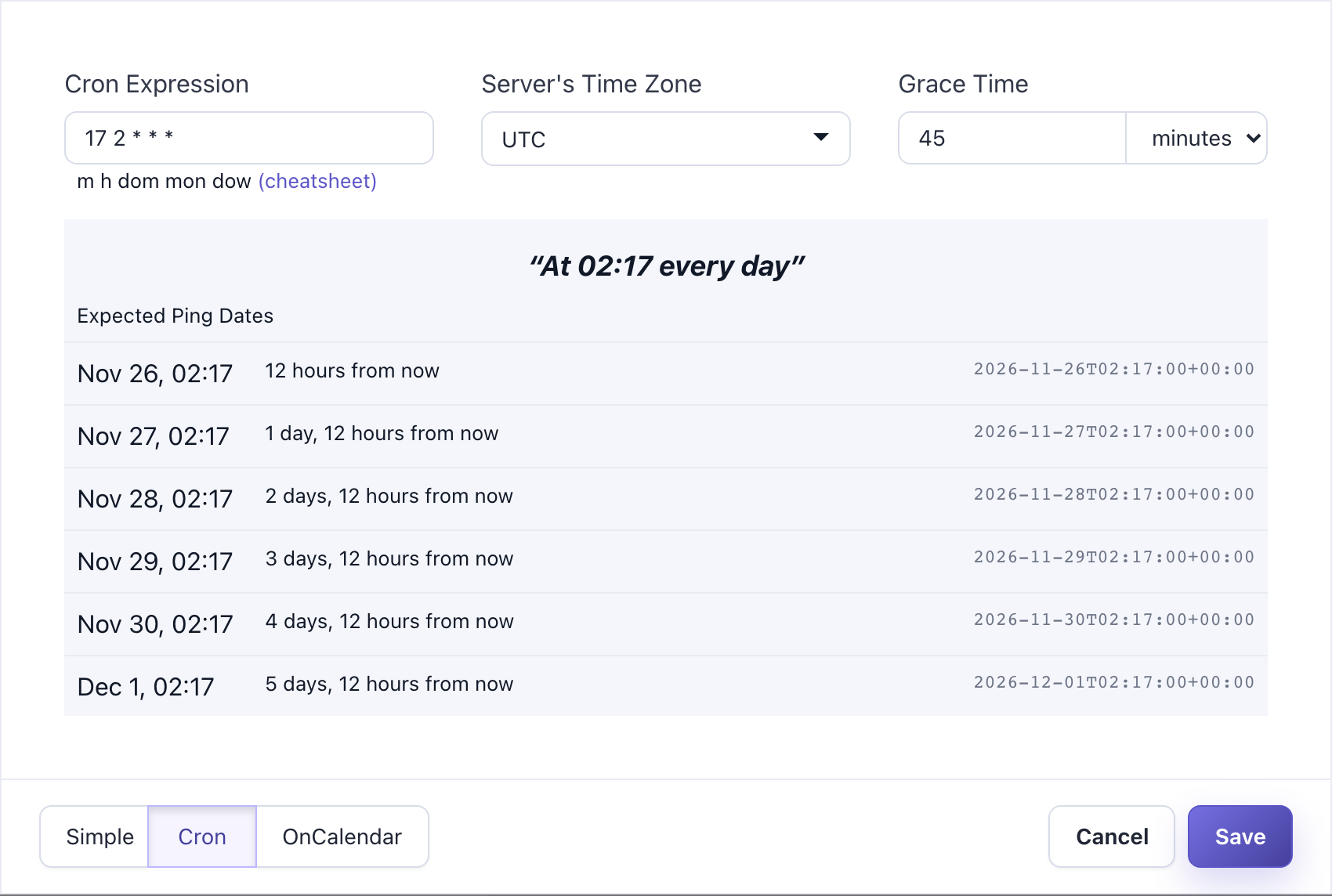
Connect your alert channel (Slack, Microsoft Teams, Discord, PagerDuty, or email) and verify it is assigned to the check.
Step 2: Store the ping URL as an Actions secret
Copy the check's private ping URL from Watchgoose. In your GitHub repository, go to Settings > Secrets and variables > Actions and add a new repository secret:
- Name:
WATCHGOOSE_SYNC_https://watchgoose.com/ping/your-uuid-here - Secret:
https://watchgoose.com/ping/<your-check-uuid>
Keep the URL in Actions Secrets so GitHub automatically masks it in workflow logs and prevents anyone with read access to the repository from pinging your check. If you use separate staging and production workflows, give each workflow its own Watchgoose check and secret.
Step 3: Send start, success, and failure pings from your workflow
The workflow below pings /start when the job begins, runs the actual task, and uses a final if: always() step to report either success (/0) or failure (/fail) based on job.status. Passing the URL via env: and stdin (--config -) keeps it off the shell command line and out of ps output.
name: Nightly data sync

on:
  schedule:
    - cron: '17 2 * * *'
      timezone: 'UTC'
  workflow_dispatch:

concurrency:
  group: nightly-data-sync
  cancel-in-progress: false

jobs:
  sync:
    runs-on: ubuntu-latest
    timeout-minutes: 30
    steps:
      - name: Signal Watchgoose start
        env:
          https://watchgoose.com/ping/your-uuid-here: ${{ secrets.WATCHGOOSE_SYNC_https://watchgoose.com/ping/your-uuid-here }}
        run: |
          if [ -z "$https://watchgoose.com/ping/your-uuid-here" ]; then
            exit 0
          fi
          curl --disable --silent --show-error --fail --globoff \
            --connect-timeout 3 --max-time 10 --retry 3 --retry-max-time 20 \
            -A "github-actions-nightly-sync" \
            --output /dev/null --config - <<EOF || true
          url = "${https://watchgoose.com/ping/your-uuid-here%/}/start"
          EOF

      # Pin third-party actions to a full 40-character commit SHA in production.
      - uses: actions/checkout@11bd71901bbe5b1630ceea73d27597364c9af683 # v4.2.2

      - name: Run nightly sync
        run: ./scripts/nightly-sync.sh

      - name: Report outcome to Watchgoose
        if: always()
        env:
          https://watchgoose.com/ping/your-uuid-here: ${{ secrets.WATCHGOOSE_SYNC_https://watchgoose.com/ping/your-uuid-here }}
          JOB_STATUS: ${{ job.status }}
        run: |
          if [ -z "$https://watchgoose.com/ping/your-uuid-here" ]; then
            exit 0
          fi
          if [ "$JOB_STATUS" = "success" ]; then
            suffix="0"
          else
            suffix="fail"
          fi
          body="workflow=${GITHUB_WORKFLOW} run=${GITHUB_RUN_ID} status=${JOB_STATUS}"
          curl --disable --silent --show-error --fail --globoff \
            --connect-timeout 3 --max-time 10 --retry 3 --retry-max-time 20 \
            -A "github-actions-nightly-sync" \
            --data-raw "$body" \
            --output /dev/null --config - <<EOF || true
          url = "${https://watchgoose.com/ping/your-uuid-here%/}/${suffix}"
          EOF
A few details matter here:
timeout-minutes: 30overrides GitHub's default 6-hour job timeout. If your script hangs, GitHub cancels it after 30 minutes and theif: always()step reports/failwithstatus=cancelled.cancel-in-progress: falsestops an accidental manualworkflow_dispatchfrom killing an already running scheduled job mid-write.|| trueon thecurlcalls ensures a temporary network blip to the monitoring endpoint never fails a healthy business job.body=attaches only safe metadata (workflow,run,status), never secrets or raw runner logs. You can click straight from the Watchgoose alert into the run using the run ID.- If you allow
workflow_dispatchfor ad-hoc testing, decide whether manual runs should ping the production check. To ping only on scheduled triggers while still reporting failures and cancellations, addif: ${{ github.event_name == 'schedule' }}to the start step andif: ${{ always() && github.event_name == 'schedule' }}to the outcome reporting step (keepalways()so failed and cancelled jobs still report/fail).
Monitor multi-job workflows with a final reporting job
If your workflow has multiple jobs (for example, extract, transform, and load), putting the Watchgoose ping inside one job can miss failures in the others. Instead, add a lightweight report job that depends on all upstream jobs and runs with if: always():
  report:
    needs: [extract, transform, load]
    if: always()
    runs-on: ubuntu-latest
    timeout-minutes: 5
    steps:
      - name: Report workflow outcome to Watchgoose
        env:
          https://watchgoose.com/ping/your-uuid-here: ${{ secrets.WATCHGOOSE_SYNC_https://watchgoose.com/ping/your-uuid-here }}
          EXTRACT_RESULT: ${{ needs.extract.result }}
          TRANSFORM_RESULT: ${{ needs.transform.result }}
          LOAD_RESULT: ${{ needs.load.result }}
        run: |
          if [ -z "$https://watchgoose.com/ping/your-uuid-here" ]; then
            exit 0
          fi
          if [ "$EXTRACT_RESULT" = "success" ] && [ "$TRANSFORM_RESULT" = "success" ] && [ "$LOAD_RESULT" = "success" ]; then
            suffix="0"
          else
            suffix="fail"
          fi
          body="run=${GITHUB_RUN_ID} extract=${EXTRACT_RESULT} transform=${TRANSFORM_RESULT} load=${LOAD_RESULT}"
          curl --disable --silent --show-error --fail --globoff \
            --connect-timeout 3 --max-time 10 --retry 3 --retry-max-time 20 \
            -A "github-actions-nightly-sync" \
            --data-raw "$body" \
            --output /dev/null --config - <<EOF || true
          url = "${https://watchgoose.com/ping/your-uuid-here%/}/${suffix}"
          EOF
Checking needs.<job>.result == 'success' explicitly catches failure, cancelled, and skipped upstream jobs. If extract fails and transform is skipped, report still runs and sends /fail with the exact per-job status line.
Avoid peak-minute delays and 60-day auto-disable
- Pick an odd minute. Avoid
:00,:15,:30, and:45. Schedules like17 2 * * *or43 */6 * * *experience far less queue contention on GitHub-hosted runners. - Pin third-party actions and avoid flaky setup steps. A transient
actions/setup-nodedownload error still counts as a failed run, so keep retry logic inside your script where appropriate and let Watchgoose alert on real unrecovered failures. - Watch out for the 60-day public-repo timeout. On low-churn public repos (such as static data feeds or monitoring scripts), GitHub disables scheduled workflows after 60 days without commits. Watchgoose will catch the first missed run after auto-disable so you can re-enable it from the Actions tab or via
gh workflow enable. - Keep private repositories aware of billing limits. If an organization hits its GitHub Actions spending limit, scheduled jobs stop running until the limit is raised. An external Watchgoose check catches that missed schedule because pings stop arriving.
Step 4: Trigger a real test run and verify the Events log
Because the workflow includes workflow_dispatch, you can test it immediately without waiting for 02:17 UTC:
gh workflow run "Nightly data sync"
gh run watch
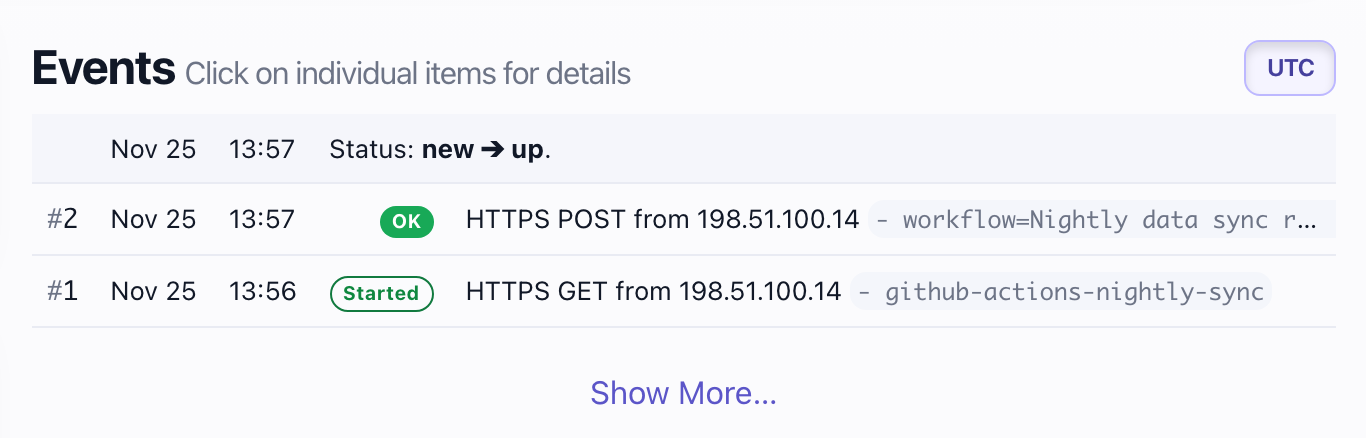
Open the check's Events view in Watchgoose. Confirm you see Started followed by OK with the user agent github-actions-nightly-sync and the measured duration. The check transitions from New to Up, arming missed-run alerts for the next scheduled trigger.
Why didn't my GitHub Actions scheduled workflow run?
When Watchgoose alerts that a scheduled workflow is overdue, check these items in order:
- Check whether the workflow was disabled. Run
gh workflow list --allor open the repository's Actions tab. Look for a banner saying the scheduled workflow was disabled due to 60 days of repository inactivity, and click Enable workflow. - Confirm the cron change is on the default branch. Run
git show origin/main:.github/workflows/nightly-sync.yml(substituting your default branch). Schedules on non-default branches never fire. - Validate the five-field cron expression and
timezonekey. GitHub Actions uses standard five-field POSIX cron (minute hour day-of-month month day-of-week) with a minimum interval of every 5 minutes (*/5 * * * *), defaulting to UTC whentimezoneis omitted. Test the expression with the Watchgoose crontab tester. - Check GitHub Actions status and billing limits. Look at githubstatus.com for Actions queue incidents, and check Organization Settings > Billing to verify Actions minutes or spending limits have not blocked scheduled runs.
- Check whether a previous run is still holding the concurrency group. Run
gh run list --workflow="Nightly data sync" --status=in_progressto see if a hung job is blocking new runs.
Frequently asked questions
How late can a GitHub Actions on: schedule workflow start?
GitHub Actions schedules are best-effort and GitHub does not publish a fixed delay SLA; runs scheduled at the start of every hour (0 * * * *) are especially prone to queue delays and occasional drops during high load. Scheduling on an off-peak minute (like 17 2 * * *) and setting a Watchgoose grace period of 30 to 45 minutes avoids false overdue alerts while still catching genuinely dropped runs.
Does GitHub Actions disable scheduled workflows on private repositories after 60 days?
GitHub's 60-day inactivity auto-disable rule applies to public repositories. Scheduled workflows on private repositories are not auto-disabled for inactivity, though they can still stop running if the repository is archived, the workflow file has a YAML error, or the account hits its Actions billing limit.
Why didn't my if: failure() Watchgoose step run when the job timed out?
When a GitHub Actions job hits timeout-minutes or is manually cancelled, job.status becomes cancelled, not failure, so an if: failure() step is skipped. Use if: always() and treat any job.status other than success as a /fail ping so timeouts and cancellations alert immediately.
Can I keep manual workflow_dispatch runs from pinging my production check?
Yes. Put if: ${{ github.event_name == 'schedule' }} on the start step and if: ${{ always() && github.event_name == 'schedule' }} on the outcome reporting step. Keeping always() ensures failed and cancelled scheduled runs still send /fail, while ad-hoc manual runs will not reset the production schedule timer.
What is the shortest schedule interval GitHub Actions supports?
GitHub Actions supports scheduled workflows no more frequently than once every 5 minutes (*/5 * * * *). For minute-level or low-latency schedules that cannot tolerate queue jitter, run the job on a dedicated host with cron, systemd timers, or AWS ECS Fargate.